


Kubernetes Security Audit with kube-bench: Automating CIS Benchmarking with Jobs and Ceph S3
Keeping a Kubernetes cluster healthy is one thing. Keeping it secure is another. A cluster can be fully operational while still drifting away from security recommendations: permissions become broader, configuration changes accumulate, and settings that were correct during initial deployment may no longer match current security guidance. A Kubernetes security audit with kube-bench turns that problem from a one-off manual check into a repeatable operational process.
The CIS Kubernetes Benchmark audits provide a structured way to catch this drift, but running them manually only gives you a snapshot in time. For an operational environment, the more useful question is: how do we turn CIS auditing into a repeatable cluster workflow that runs on its own?
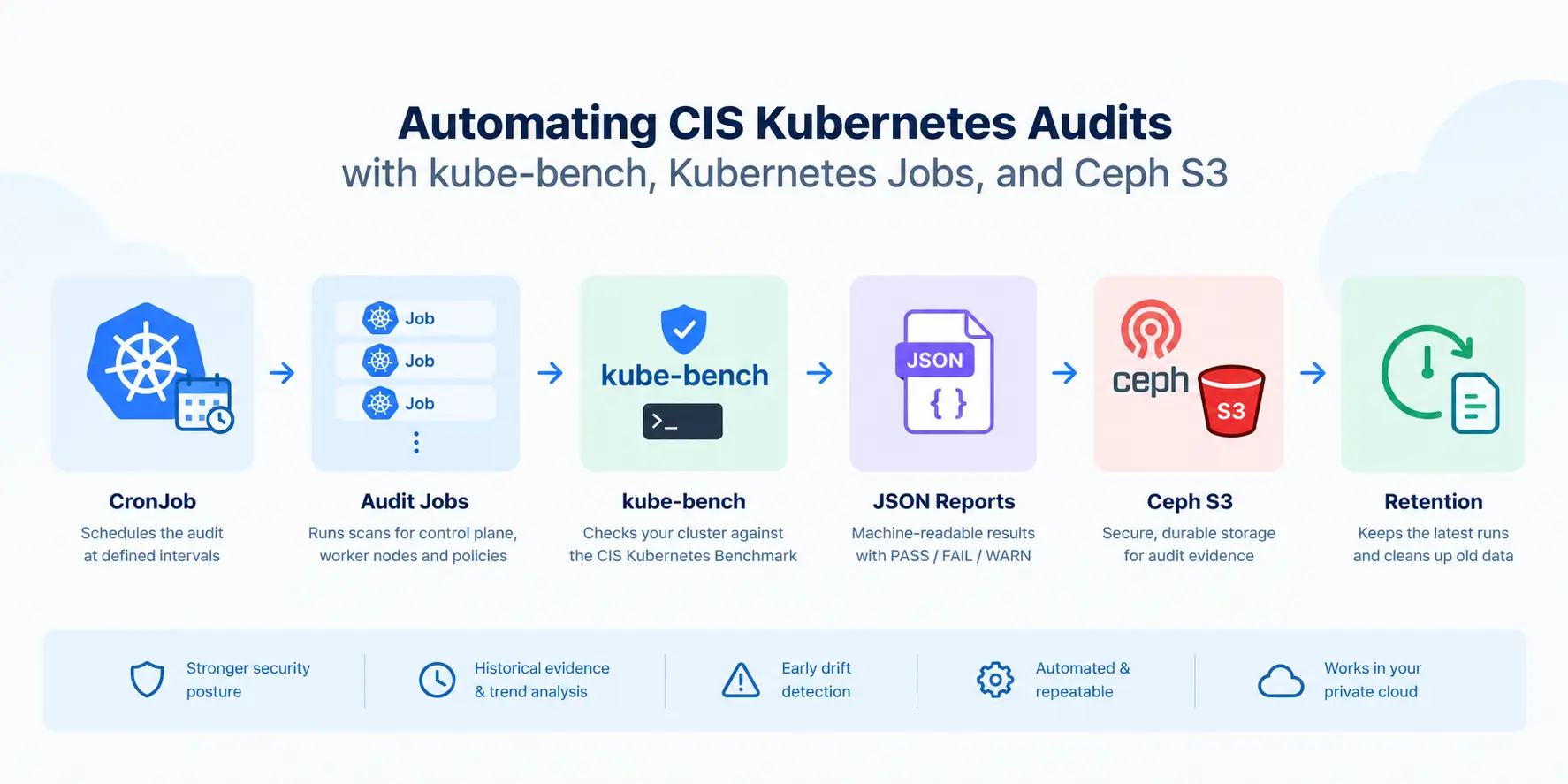
In this article, we explore one practical answer: combine kube-bench, Kubernetes Jobs and CronJobs, and Ceph S3-compatible object storage. The result is a scheduled audit pipeline that scans every relevant part of the cluster, stores detailed JSON reports, keeps a limited history of runs, and provides concise PASS/FAIL/WARN summaries in the job logs.
The implementation described here was validated on a our lab development cluster and is based on the original assignment behind this article.
What Is the CIS Kubernetes Benchmark?
The Center for Internet Security (CIS) Kubernetes Benchmark is a collection of security configuration recommendations designed to help teams assess whether Kubernetes environments are configured according to recognized hardening guidance. The benchmark covers areas such as the Kubernetes control plane, etcd, worker nodes, and Kubernetes policies.
A kube-bench result normally falls into several categories:
- PASS — the configuration meets the benchmark recommendation.
- FAIL — the configuration does not satisfy the check.
- WARN — the check requires additional review or cannot be evaluated conclusively.
- INFO — informational output.
That distinction becomes particularly important when the benchmark is automated.
Eine CIS FAIL does not necessarily mean that the audit failed. It can simply mean that the scanner successfully discovered a security configuration that needs attention. In other words, the cluster can be healthy while the audit reports findings. Think of it like a building inspection. If an inspector finds a broken fire door, the inspection itself did not fail – the inspection succeeded in finding the broken door.
That difference becomes critical when integrating security audits into CI/CD, monitoring, alerting, or GitOps workflows.
Why kube-bench?
kube-bench is an open-source security scanner from Aqua Security that is distributed under the Apache 2.0 license. kube-bench checks Kubernetes cluster configuration against CIS Kubernetes benchmark recommendations. It can run specific benchmark targets and produce machine-readable JSON output, making it an essential building block for an automated audit workflow which is commonly required for ISO, SOC or other certification frameworks. kube-bench can also run directly inside Kubernetes Jobs, which makes it a good fit for the use case we present in this article.
One particularly useful feature is explicit benchmark selection. kube-bench supports the –benchmark option as well as individual targets such as master, node, etcd, controlplane, und policies.
In our implementation, the benchmark is explicitly configured rather than relying on automatic version detection:
kube-bench run \
  --benchmark cis-1.12 \
  --targets node \
  --json \
  --outputfile /reports/report.json
The important detail is not the exact command but the principle: pin the benchmark deliberately.
Why? Because Kubernetes versions and CIS Benchmark versions do not have a one-to-one relationship. The current kube-bench configuration maps Kubernetes 1.32–1.33 to cis-1.12 and Kubernetes 1.34–1.35 to cis-2.0. Meanwhile, CIS has since published Kubernetes Benchmark 2.1.0, covering Kubernetes versions 1.34 and 1.35.
For that reason, an automated implementation should treat the benchmark version as configuration rather than assuming that the scanner will always choose the right version automatically. Before deploying the workflow to a newer Kubernetes release, verify that the kube-bench version and benchmark configuration support the Kubernetes version you are auditing.
The original implementation deliberately used cis-1.12, with node-level Jobs explicitly selecting that benchmark rather than relying on automatic version detection. Explicit benchmark selection is particularly useful for node-level Jobs that intentionally do not receive Kubernetes API credentials.
From a CLI Command to an Audit Workflow
Running a kube-bench from a terminal is useful for troubleshooting. But it is not, by itself, an audit process.
For an operational Kubernetes environment, we wanted the workflow to run regularly, inspecting all relevant cluster components, distinguish CIS findings from execution failures, control its resource consumption (scanner CPU and memory resources), preserve detailed evidence, and continue collecting results even if an individual node cannot be scanned.
The architecture therefore uses a Kubernetes CronJob as a controller.
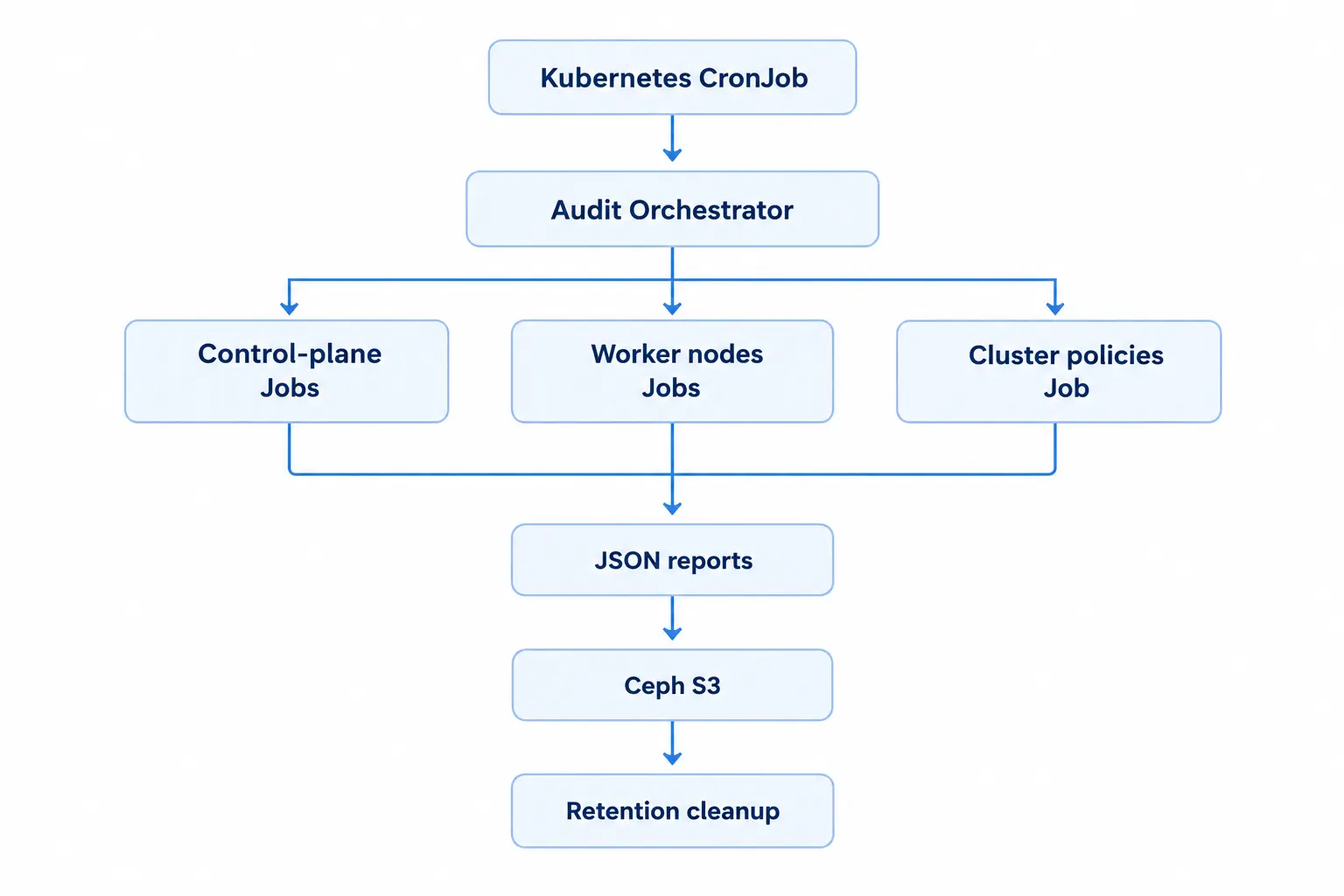
The CronJob does not perform every security check itself. Instead, it creates child Jobs sequentially and waits for each one to finish. This gives the workflow a predictable execution pattern and avoids launching a large number of resource-intensive scans simultaneously.
This is a good example of using Kubernetes controllers as the automation layer. A Kubernetes Job is designed for exactly this kind of one-off task: run a workload to completion and record whether it succeeded. A CronJob adds the scheduling layer on top.
Manual audit vs. automated audit
| Approach | Manual kube-bench run | Automated Job workflow |
|---|---|---|
|
Scheduling |
Manual |
CronJob |
|
Cluster coverage |
Operator-dependent |
Dynamically discovered |
|
Results |
Terminal output |
JSON + Kubernetes logs |
|
Historical evidence |
Usually manual |
S3 Bucket |
|
Resource control |
Ad hoc |
Requests, limits and sequential execution |
|
Failure handling |
Operator-driven |
Orchestrated |
|
Retention |
Manual |
Automated |
|
GitOps integration |
Limited |
Natural fit |
The key shift is from running a security command to a continuous security control with evidence.
Scanning Every Part of the Cluster
A Kubernetes cluster is not one homogeneous machine. Different CIS targets inspect different components, so a complete audit requires multiple scans.
For control-plane nodes we run:
master
etcd
controlplane
node
For worker nodes:
node
Finally, one cluster-level Job runs:
policies
One subtle but important detail is the node target. It needs to run on every node, including control-plane nodes, because node checks inspect host-level kubelet and operating-system configuration. Skipping control-plane nodes would therefore leave part of the cluster outside the audit boundary.
The orchestrator discovers the nodes dynamically instead of maintaining a static list. That makes the audit much more resilient to infrastructure changes: add a node to the cluster and the next audit can discover it automatically.
control_plane_nodes="$(kubectl get nodes \
  -l node-role.kubernetes.io/control-plane \
  -o jsonpath='{range .items[*]}{.metadata.name}{"\n"}{end}')"

all_nodes="$(kubectl get nodes \
  -o jsonpath='{range .items[*]}{.metadata.name}{"\n"}{end}')"
This is especially useful in a GitOps-managed environment like our c12.cloud, where infrastructure and Kubernetes configuration evolve through declarative changes. While the orchestrator discovers the current nodes at runtime, Argo CD manages the desired state of the audit resources themselves. This separation helps keep the audit configuration consistent while allowing the workflow to adapt to changes in the cluster.
For more on this approach, see our article on Argo CD and Kubernetes-native GitOps.
Host-Level Checks Without a Privileged Container
Security scanners sometimes create an uncomfortable paradox: you need privileged access to inspect the system you are trying to secure.
kube-bench’s node checks need access to configuration files and directories on the Kubernetes host. The implementation solves this by pinning the scan Job to the target node and mounting selected host paths read-only, including:
/etc/kubernetes
/var/lib/kubelet
/var/lib/etcd
/etc/cni/net.d
/opt/cni/bin
/etc/passwd /etc/group
The node-level scan Pods use hostPID together with read-only host mounts, while avoiding a broadly privileged container.
This follows a broader Kubernetes security principle: give a workload the minimum access required for its task und avoid granting broad privileges simply because the workload is security-related.
Kubernetes security contexts provide controls such as privilege escalation, Linux capabilities, filesystem permissions, and other isolation mechanisms. The Kubernetes documentation also recommends disabling privilege escalation and dropping unnecessary capabilities where possible.
For example, the uploader and orchestration containers require even less privileges. For those containers, we can explicitly disable privilege escalation and drop Linux capabilities:
securityContext:
  allowPrivilegeEscalation: false
  capabilities:
    drop:
      - ALL
The cluster-level policy checks follow a different model. They do not need host filesystem access; instead, they use a dedicated ServiceAccount with narrowly scoped RBAC permissions. The result is a useful separation of concerns: the scanner gets the access required to inspect a node, while the orchestration and storage components remain much more restricted.
Limiting Resource Usage (Keeping the Security Audit From Becoming a Production Problem)
A security audit should not become the workload that causes resource crunch. The scanner Jobs therefore have explicit resource requests and limits set. The recommended values are:
resources:
  requests:
    cpu: 50m
    memory: 64Mi
  limits:
    cpu: 500m
    memory: 256Mi
The Jobs also execute sequentially rather than scanning every node at the same time. There is an obvious trade-off: sequential execution takes longer, especially with 100-s of nodes in the cluster. But for a weekly audit, predictable resource consumption is generally more valuable than shaving some minutes or even a couple of hours from the audit window.
It is similar to running maintenance checks on a fleet of servers. You could inspect every machine simultaneously and finish faster, but if the inspection itself consumes CPU, memory, disk I/O, or network bandwidth. Depending on the nature of the workloads, one could either schedule a parallel execution at 1.00 AM in the morning when the cluster is known to idle. Or, run a sequential execution. For security testing, boring and predictable is often a better option.
Preventing Stuck Kubernetes Audit Jobs
Automation needs a timeout.
Imagine that the orchestrator creates a scanner Job and waits for it indefinitely because a node went offline or the Pod became stuck. Subsequent scheduled audits could then be skipped while the previous orchestrator remains active, leaving the cluster without fresh audit results.
With concurrencyPolicy: Forbid, the same CronJob skips subsequent runs while the previous one remains active. Therefore, skipped audits are the concern, rather than overlapping runs..
Each child Job therefore has an execution deadline. The implementation sets:
activeDeadlineSeconds: 1800
That gives each scanner Job a 30-minute execution deadline. Kubernetes supports activeDeadlineSeconds specifically for terminating Jobs that remain active beyond a defined duration; when the deadline is reached, the Job is marked failed with a DeadlineExceeded reason.
The orchestrator also checks for both successful completion and the Kubernetes Failed=True condition rather than simply waiting for a successful.
while true; do
  succeeded="$(kubectl -n "${namespace}" get job "${job_name}" \
    -o jsonpath='{.status.succeeded}' 2>/dev/null || true)"

  failed_condition="$(kubectl -n "${namespace}" get job "${job_name}" \
    -o jsonpath='{.status.conditions[?(@.type=="Failed")].status}' \
    2>/dev/null || true)"

  if [ "${succeeded}" = "1" ]; then
    return 0
  fi

  if [ "${failed_condition}" = "True" ]; then
    return 1
  fi

  sleep 5
done
This is an important operational pattern: every automated security check needs a defined failure mode. An alert on the failed jobs can then fire and notify the operators about the issue.
One Failed Node Should Not Hide the Rest of the Cluster
One of the most useful lessons from testing came from a failure. During validation, one scanner was evicted because its target node was experiencing storage pressure.
That exposed an important orchestration problem: If the parent orchestrator had immediately exited when that child Job failed, the audit would have lost all results from the remaining nodes.
Instead, scan failures are recorded, and the workflow continues:
if ! wait_for_job "${job_name}"; then
  scan_failures=$((scan_failures + 1))
  failed_jobs="${failed_jobs} ${job_name}"
  echo "Continuing after failed scan: ${job_name}"
  return 0
fi
The remaining nodes and policy checks still run. Retention is also performed, and only at the end does the orchestrator evaluate whether any technical scan failures occurred.
This gives us both properties we want:
- Continue collecting as much audit evidence as possible;
- Mark the overall audit unsuccessful if technical execution failures occurred.
That gives operators both maximum visibility and an honest execution status. The same principle applies when a child Job cannot even be created. Creation errors are handled explicitly instead of relying on shell -e behavior to terminate the entire run.
Storing Kubernetes Audit Reports in Ceph S3
Each kube-bench Job produces a JSON report:
kube-bench run \
  --benchmark cis-1.12 \
  --targets "${target}" \
  --json \
  --outputfile /reports/report.json
Each scan Job runs kube-bench as an init container, which writes a JSON report to a shared emptyDir volume at /reports/report.json. Once kube-bench completes successfully, the main container, uploader, uploads the report using the AWS CLI to an S3-compatible bucket backed by Ceph Object Gateway in our setup.
Security audit reports are historical evidence. They answer questions such as:
- What did the cluster look like last (N) week(-s)?
- When did a configuration or security issue first appear?
- Did a hardening change actually improve the audit result?
- Which node produced a particular finding?
- What was the audit state before an incident or infrastructure change?
Ceph Object Gateway provides an S3-compatible API, making it suitable for applications that need standard object-storage semantics without depending on a public-cloud storage service. Of course, one can still encrypt and store the audit results in pretty much any cloud providing S3.
Since we orchestrate Ceph with Rook, an ObjectBucketClaim can be used to request an object storage bucket directly from the Kubernetes. Rook can generate the Secret containing credentials and a ConfigMap containing endpoint information for workloads consuming the bucket.
Every audit gets a UTC timestamp-based run ID, keeping individual runs isolated while making historical comparison straightforward:
run_id="$(date -u +%Y%m%d%H%M%S)"The resulting layout can be simple:
<run-id>/
├── control-plane-1-master.json
├── control-plane-1-etcd.json
├── control-plane-1-controlplane.json
├── control-plane-1-node.json
├── control-plane-2-master.json
├── control-plane-2-etcd.json
├── control-plane-2-controlplane.json
├── control-plane-2-node.json
├── control-plane-3-master.json
├── control-plane-3-etcd.json
├── control-plane-3-controlplane.json
├── control-plane-3-node.json
├── worker-1-node.json
├── worker-2-node.json
├── worker-3-node.json
└── policies.json
This provides a complete snapshot of a particular audit while keeping reports from different runs clearly separated. For a private cloud platform, this architecture has another advantage: the security evidence stays inside infrastructure that you control.
That is particularly relevant for organizations operating regulated, sovereign, air-gapped, or data-sensitive environments. With a platform such as our c12n Private Cloud, Kubernetes, Ceph, GitOps, monitoring, and other cloud-native services can operate as part of an integrated private cloud stack and do not require audit data to leave the environment.
Keeping a Limited Audit History
Compliance data is useful historically, but keeping every audit forever is rarely necessary. Instead, the workflow performs retention cleanup after the scans finish. It lists the available S3 run prefixes, keeps the newest configured number, and removes older results.
For example, a retention value of 10 combined with a weekly audit gives ten weeks of history. Should this be a year, no problem, we just configure the value accordingly.
This also makes retention independent from Kubernetes Job TTL cleanup. Kubernetes can delete completed Job objects while the actual audit reports remain available in object storage. That separation makes the audit system much more useful for historical analysis and serves as hard evidence for auditors.
Making CIS Results Human-Readable
JSON is useful for automation, but engineers should not need to download a report just to answer a basic question such as “did this node have CIS failures?”
Fortunately, kube-bench’s JSON output includes aggregate totals. A report can contain information such as:
{
  "total_pass": 19,
  "total_fail": 1,
  "total_warn": 5,
  "total_info": 0
}
We extract these values with jq immediately after the scan:
jq -r \
  '.Totals |
  "CIS summary: PASS=\(.total_pass) FAIL=\(.total_fail) WARN=\(.total_warn) INFO=\(.total_info)"' \
  /reports/report.json
The orchestrator then includes the scanner log in its own output. A completed run contains a summary for every node and CIS target. When correlated with the child Job being executed, the results look like this:
control-plane-1 / master:       PASS=48 FAIL=3 WARN=9 INFO=0
control-plane-1 / etcd:         PASS=7  FAIL=0 WARN=0 INFO=0
control-plane-1 / controlplane: PASS=1  FAIL=0 WARN=4 INFO=0
worker-1 / node:                PASS=19 FAIL=1 WARN=5 INFO=0
The detailed findings remain available in S3 when deeper investigation is required.This gives the system two interfaces:
- Kubernetes logs for fast operational visibility which are also saved to OpenSearch.
- S3 JSON reports for detailed analysis and historical evidence.
That pattern can later be extended with dashboards, alerting on failed jobs or critical fails, ticket creation, or security reporting without changing the underlying audit mechanism.
A CIS FAIL Is a Finding, Not an Infrastructure Failure
This distinction deserves special attention because it is one of the easiest mistakes to make when automating security tooling. Suppose kube-bench reports:
PASS=19 FAIL=1 WARN=5The scanner was completed successfully. It executed the requested checks, generated a valid report, and uploaded the results to S3. The FAIL=1 is an audit finding, not an infrastructure failure. It means that one CIS check failed.
The two states should therefore be treated separately:
| Condition | Meaning |
|---|---|
|
CIS check FAIL |
Scanner succeeded and found a security issue |
|
CIS check WARN |
Scanner succeeded but the result needs review |
|
Scanner Job failure |
Audit execution failed |
|
Report upload failure |
Audit evidence may be incomplete |
|
Job creation failure |
Audit execution could not proceed |
|
Overall audit failure |
One or more technical execution failures occurred |
This distinction allows alerting to be designed properly. It prevents a healthy audit system from appearing permanently broken simply because it is detecting configuration issues. For example, a security team might want a high-priority alert when a CIS control changes from PASS to FAIL, while the platform team receives a different alert if the scanner itself cannot run.
That is far more useful than treating every non-zero security finding as a broken monitoring system. Alerting, if required, can be handled separately from scan execution status.
Validating the Workflow on a Kubernetes Cluster
We validated the complete workflow in a dedicated test environment using a six-node Kubernetes cluster consisting of three control-plane nodes and three worker nodes. The purpose of this run was to verify the audit workflow itself, including scan orchestration, report generation, uploads, retention, and failure handling.
The full audit consisted of:
- three master scans;
- three etcd scans;
- three controlplane scans;
- six node scans;
- one policies scan;
- report uploads;
- And retention cleanup.
The complete sequential run took approximately 23 minutes.
The CIS results below are examples from this test cluster. They demonstrate how findings are reported by the workflow.
A representative scan produced:
Node:
PASS=19 FAIL=1 WARN=5 INFO=0
Control-plane master:
PASS=48 FAIL=3 WARN=9 INFO=0
Policies:PASS=2 FAIL=0 WARN=32 INFO=0
The relatively high WARN count for the policy target is expected. Many controls in the CIS Kubernetes Policies section require manual review or cannot be evaluated conclusively by an automated scan. kube-bench reports such checks as WARN rather than FAIL, so these results indicate checks that require additional review, not 32 failed policy controls.
Most importantly, the generated reports confirmed that the explicitly configured benchmark was used:
{
  "version": "cis-1.12",
  "detected_version": "none"
}
For node-level Jobs that deliberately do not receive Kubernetes API credentials, detected_version can be none. Benchmark selection is unaffected because cis-1.12 is explicitly configured.
Scheduling the Audit With Kubernetes CronJobs
For this environment, a weekly audit is sufficient, therefore the CronJob schedule looks like:
schedule: "0 4 * * 0"
concurrencyPolicy: Forbid
The Forbid policy prevents a new scheduled audit from starting if the previous one is still running. Kubernetes CronJobs support this concurrency policy specifically to control overlapping executions.
This is particularly useful for a sequential audit. If the first run takes about 20 minutes and the scheduler launches another run before it finishes, two orchestrators could otherwise compete for resources and create duplicate Kubernetes Jobs.
The audit can also be enabled selectively in a GitOps-managed environment. For example, the same GitOps configuration can target multiple environments while allowing auditing to be enabled only where the required permissions, object storage, and operational capacity are available.
GitOps Integration
The kube-bench auditing workflow is deployed and managed through Argo CD using GitOps principles. Its configuration is maintained in Git, keeping the auditing infrastructure version-controlled and allowing changes to be reviewed through pull requests before deployment.
Argo CD continuously reconciles the desired state defined in Git with the Kubernetes resources running in the cluster. In our setup, automated synchronization, self-healing, and pruning are enabled to keep the deployed configuration aligned with Git. Argo CD manages the workflow’s deployment and configuration, while the scheduled CronJob orchestrates the scans. Each scan Job uploads its report to Ceph S3 for storage and later review.
Why This Pattern Works Well for Kubernetes
The architecture is deliberately made from relatively simple building blocks:
kube-bench performs the security checks.
Kubernetes Jobs provide isolated, repeatable execution.
CronJobs provide scheduling.
RBAC and security contexts control access.
Ceph S3 provides durable audit evidence.
GitOps can manage the entire configuration.
That makes the design particularly attractive for private-cloud environments where teams want to keep security data, infrastructure configuration, and operational tooling under their own control.
The broader lesson is that Kubernetes security does not have to be a separate manual compliance exercise. Security checks can become another automated workload in the platform.
From Security Scanning to Continuous Security Operations & DevSecOps
A scanner by itself is useful. A workflow around the scanner is much more useful.
By combining kube-bench with Kubernetes Jobs and Ceph S3, the approach described here provides:
- repeatable CIS Kubernetes benchmarking;
- coverage of control-plane, worker-node, etcd, and policy targets;
- controlled resource consumption;
- explicit timeout and failure handling;
- continued scanning after individual node failures;
- Machine-readable and human-readable historical reports;
- concise operational summaries;
- configurable retention;
- GitOps-friendly deployment;
- storage that can remain inside a private cloud environment.
The important shift is from running a security command to operating a repeatable security audit.
Instead of asking:
“Did someone run kube-bench recently?”
you can now ask:
“What is the current security posture of the cluster, and how has it changed over time?”
That distinction makes CIS benchmarking considerably more useful in day-to-day Kubernetes operations.
From Security Scanning to Continuous Security Operations & DevSecOps
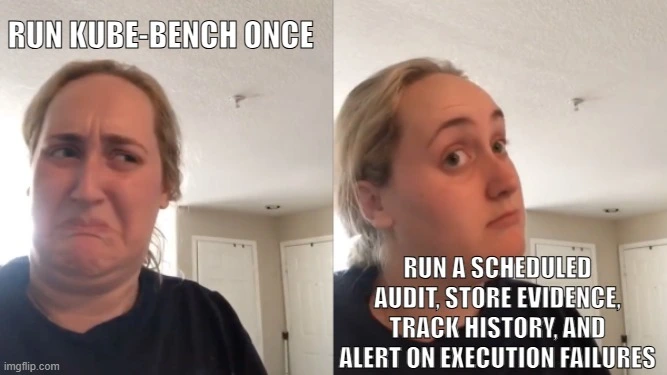
The key lesson from this implementation is simple: automating a security scanner is not the same as automating a security audit.
The scanner is just one component. The real value comes from the surrounding workflow: discovering the cluster dynamically, executing checks safely, controlling resources, handling failures without losing useful results, separating findings from execution status, preserving evidence, and cleaning up old data.
There is also one important maintenance requirement: keep the kube-bench release and CIS Benchmark version aligned with the Kubernetes versions you actually operate. Benchmark mappings evolve, and the current CIS Kubernetes Benchmark is newer than the cis-1.12 configuration used in the original implementation.
For teams operating Kubernetes as part of a private cloud, this is exactly the kind of repetitive operational work that benefits from automation.
Want to build a secure, automated Kubernetes platform on your own infrastructure? Explore c12n Private Cloud oder talk to Cloudification about designing a production-ready private cloud with Kubernetes, Ceph, GitOps, observability, and security automation at its core.


