



Best VMware Alternatives in 2026: Six Platforms Compared
Since Broadcom acquired VMware, licensing changes have pushed many organizations to reassess their virtualization costs. For some, the goal is to replace ESXi without giving up familiar VM management. Others see an opportunity to build a private cloud or run VMs alongside containerized applications.
In this article, we compare six VMware alternatives: Proxmox VE, Nutanix AHV, Microsoft Hyper-V and Azure Local, OpenStack, Red Hat OpenShift Virtualization, and Scale Computing. For each platform, we look at capabilities, use cases, limitations, and migration options, then cover selection criteria and migration planning.
VMware Alternatives at a Glance
| Platform | Solution type | Best for | Key considerations |
|---|---|---|---|
|
Proxmox VE |
Open-source virtualization |
Cost-conscious VM infrastructure |
Linux expertise, storage design, and support planning
|
|
Nutanix AHV
|
Enterprise virtualization / HCI
|
Enterprise environments with integrated or external storage
|
Licensing costs, storage and hardware compatibility, vendor dependence
|
|
Microsoft Hyper-V / Azure Local
|
Hypervisor / hybrid HCI platform
|
Microsoft-based infrastructure
|
Product differences, licensing, and Azure connectivity requirements
|
|
OpenStack
|
Open-source private cloud / IaaS
|
Scalable cloud infrastructure with self-service and APIs
|
Deployment and operational complexity, component integration
|
|
OpenShift Virtualization
|
Kubernetes-based virtualization
|
Managing VMs and containers together
|
Kubernetes expertise and supported configurations |
|
Scale Computing |
KVM-based software HCI platform |
Virtualization for branches, edge, and distributed environments |
Hardware compatibility, scalability, and integration limitations |
The final choice depends on which VMware components you use today: ESXi, vCenter, vSAN, NSX, backup tools, or other products. Replacing the hypervisor alone may leave some infrastructure requirements unmet.
Why Are Companies Looking for VMware Alternatives?
In December 2023, Broadcom announced the end of perpetual VMware license sales and a move to subscriptions. Existing perpetual licenses did not automatically expire, but access to updates and support now depends on contract terms (see Broadcom’s announcement). For customers, this changed cost forecasts and renewal plans; we analyzed the impact in our post on VMware’s licensing changes under Broadcom.
Analysts have tracked the resulting interest in alternatives. In April 2026, Gartner published The Shift Toward VMware Alternatives: Mitigating Risks and Costs. According to the report, Broadcom’s changes to VMware’s product portfolio, pricing, and partner policies are accelerating customer migrations to other platforms.
Licensing is not the only factor. Companies also weigh vendor dependence, data residency, and automation needs. For some, reassessing VMware becomes a reason to move from managing individual clusters to a private cloud model.
VMware Replacement Strategies
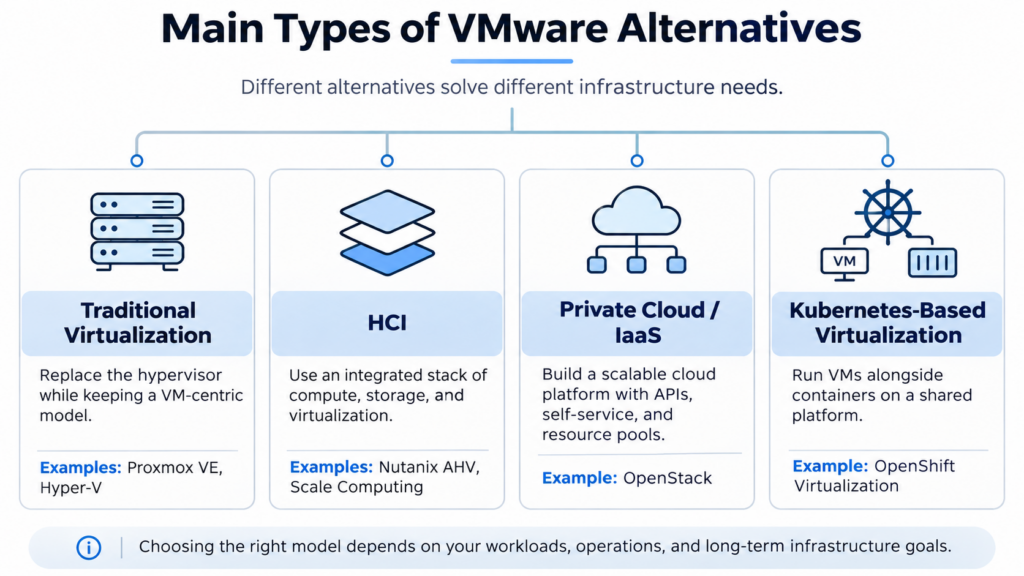
The first decision is the target infrastructure model. If you mainly need VMs and centralized management, you can switch to another virtualization system or HCI platform, such as Proxmox VE, Hyper-V, Nutanix, or Scale Computing. In this case, migration scope depends on your existing networks, storage, and administration tools.
OpenStack supports a different model: a private cloud with APIs, resource allocation across teams, self-service, and infrastructure delivered as a service. It can replace many VMware capabilities, but it requires designing a cloud platform rather than just swapping the hypervisor.
OpenShift Virtualization takes a third approach, using Kubernetes to manage virtual machines alongside containers. Since Kubernetes cannot run conventional VMs on its own, KubeVirt adds this layer through KVM and libvirt.
Finally, you can move workloads to the public cloud. This reduces on-premises hardware maintenance but changes your cost structure and your requirements for connectivity, security, and data location.
Top Six VMware Alternatives

Proxmox VE
Proxmox Virtual Environment is an open-source platform that combines KVM for virtual machines and LXC for containers. Administrators manage hosts and guests through a web interface, CLI, or API. The platform supports clustering, high availability, live migration, and built-in backups, and integrates with Proxmox Backup Server. For storage, you can use local disks, SAN/NAS, or Ceph.
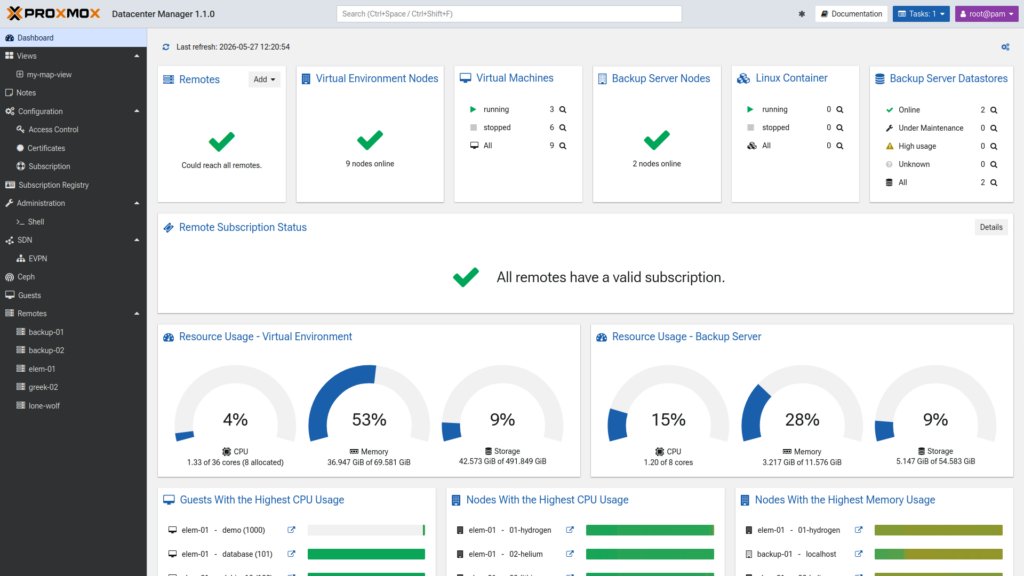
There is no software license to buy. A commercial subscription adds access to the enterprise repository and technical support. Other costs depend on your infrastructure and services.
Best for: Organizations that want VM-focused infrastructure, control over their hardware, and independence from VMware licensing. Proxmox is also an option for enterprise clusters, provided its capabilities meet your application and operational requirements.
Key considerations: Check how Proxmox integrates with your backup, monitoring, and network security tools. Keep in mind that Ceph and SDN do not automatically reproduce every vSAN or NSX capability. Your team will also need Linux and storage architecture expertise. For a detailed comparison, see Cloudification’s OpenStack vs Proxmox article.
For migration, Proxmox VE 8.2 introduced a built-in import wizard that moves virtual machines from VMware ESXi with most of their settings. Guest OS and virtual hardware compatibility still need to be checked beforehand.

Nutanix AHV
Nutanix AHV is the hypervisor in Nutanix Cloud Infrastructure, an enterprise virtualization platform. It supports HA clusters, live migration, and centralized management through Nutanix Prism. Nutanix Move helps transfer virtual machines from VMware to AHV.
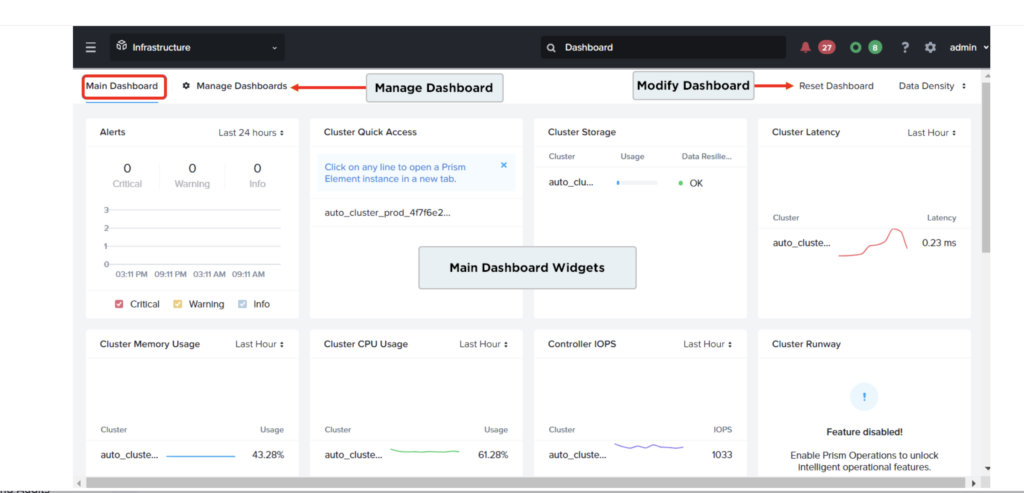
Nutanix has traditionally combined compute and storage on the same HCI nodes. Since 2025, however, the platform has also supported external storage systems, including Dell PowerFlex, Everpure FlashArray (formerly Pure Storage FlashArray), and Dell PowerStore. As a result, compute and storage can scale independently, and some organizations can keep their existing arrays when leaving VMware.
Best for: Companies that need enterprise virtualization with centralized management and commercial support. External storage support also makes Nutanix a good fit for organizations that want to retain part of their existing infrastructure.
Key considerations: External storage support is limited to specific models, software versions, and configurations, so verify hardware compatibility, replication, and disaster recovery before migrating. When estimating TCO, include Nutanix licensing, support, migration, and any infrastructure upgrades.

Microsoft Hyper-V and Azure Local
Hyper-V is Microsoft’s hypervisor, available as a Windows Server role. It supports Windows and Linux VMs, failover clusters, live migration, and management through Microsoft tools. Teams already working with Windows Server and Active Directory will find some administration procedures familiar.
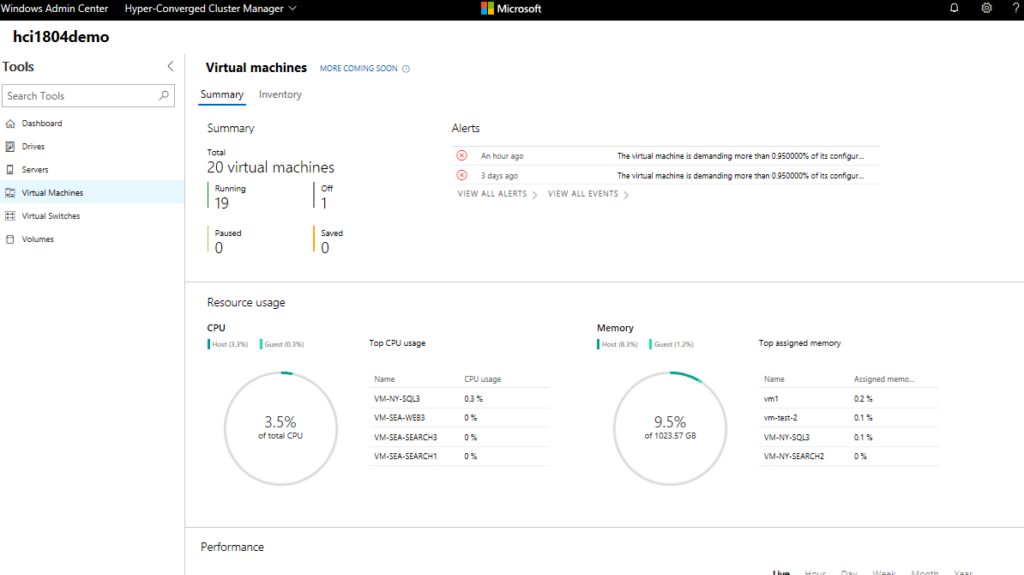
Azure Local, formerly Azure Stack HCI, is a separate HCI solution for on-premises and distributed sites. It combines Hyper-V, software-defined storage, clustering, and management with Azure Arc integration. Unlike a conventional Windows Server Hyper-V cluster, Azure Local has its own hardware and licensing requirements (see Microsoft’s documentation).
Best for: Organizations with predominantly Windows workloads, existing Microsoft licenses, and Windows Server specialists. If you need integrated HCI and hybrid management, Azure Local is worth evaluating separately.
Key considerations: Hyper-V and Azure Local are priced differently, so check Windows Server editions, guest OS licensing rights, Azure Local licensing, connectivity requirements, and supported servers. For Linux workloads, run a pilot and test your existing backup tools.
For migration to Hyper-V, System Center Virtual Machine Manager (SCVMM) can convert VMware VMs, with the source VM powered off. For Azure Local, Azure Migrate supports migration from VMware; this capability became generally available in October 2025.

OpenStack
OpenStack is an open-source IaaS platform for managing compute, networking, and storage in private or public clouds. Its core services split the work: Nova manages compute resources, Neutron handles networking, Cinder provides block volumes, and Keystone manages identity and access. In a typical architecture, virtual machines run on KVM, networking may use OVN, and storage may use Ceph, although the exact components vary by project.
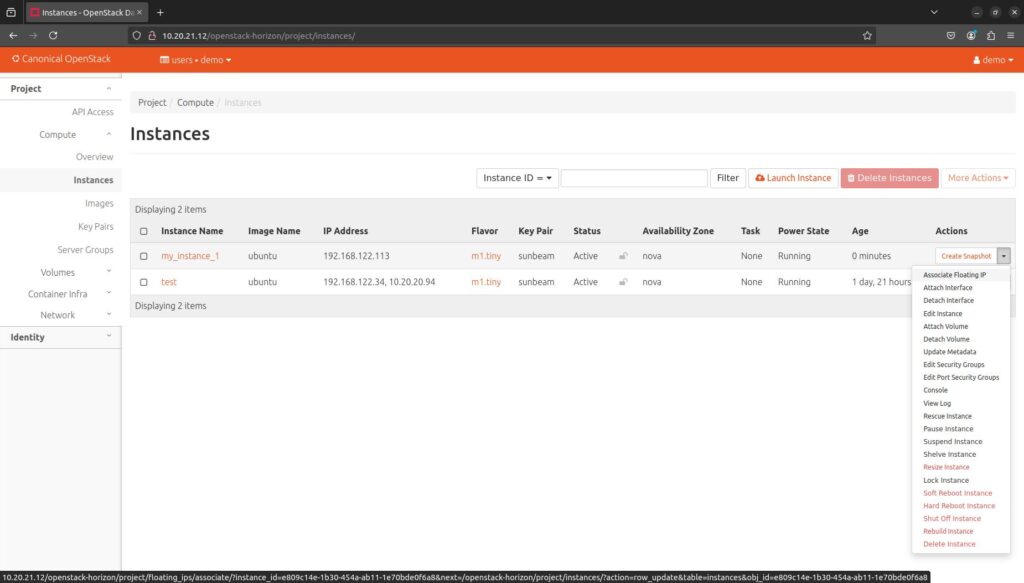
On top of this, OpenStack provides APIs, quotas, projects, and user self-service. It supports high-availability configurations, live migration, virtual networks, and integration with different storage systems. This allows OpenStack to replace VMware in most common enterprise virtualization scenarios and to add a private cloud with automated provisioning and scaling. Migration, however, requires mapping existing VMware features to the target platform and selecting the right integrations.
OpenStack has been in development since 2010 and is used by enterprises, cloud providers, and telecommunications companies. It is backed by an international ecosystem of developers, integrators, and support providers. This maturity and operational track record make it suitable for demanding availability and scalability requirements.
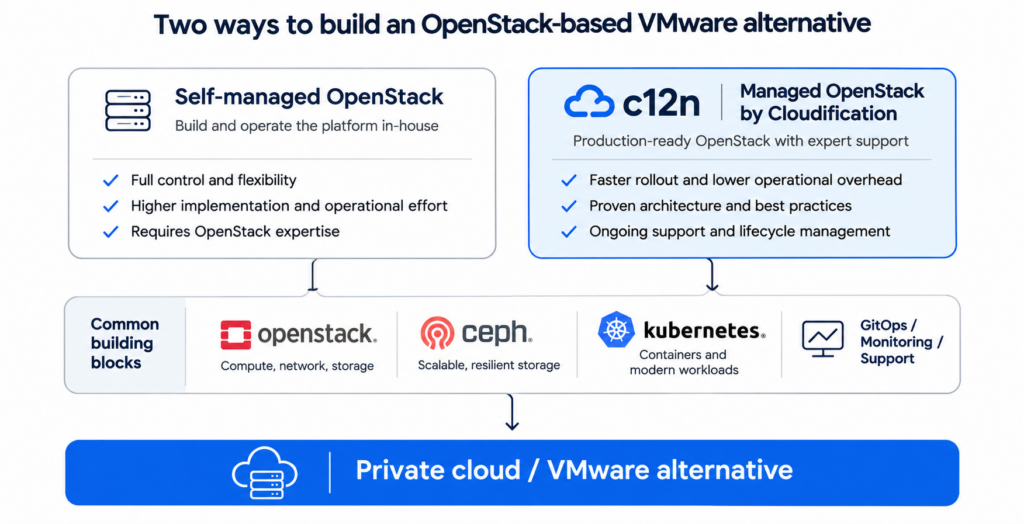
Best for: Cloud providers and organizations that need scalable private clouds with control over architecture, automation, and data location. Because OpenStack is open source under the Apache License and uses standard interfaces, you can choose your suppliers and grow your infrastructure independently of any single vendor’s licensing policies.
Key considerations: Running OpenStack yourself requires expertise in networking, storage, automation, and cloud operations. You will also need to plan for monitoring, backups, upgrades, and support. For migrating from VMware, available tools include virt-v2v, MigrateKit, and Coriolis; Cloudification covers them in its article Migrating from VMware to OpenStack.

Ready-made OpenStack solutions can simplify deployment and operations. Cloudification’s c12n Private Cloud, for example, combines OpenStack, Kubernetes, and Ceph with GitOps automation, centralized monitoring, and logging. Customers receive a ready-to-use private cloud with the option of commercial support under an agreed SLA, including 24/7 coverage if needed. Because the core components remain open source and the configuration is stored in the customer’s infrastructure, customers keep control and can switch support providers or develop the platform in-house.
You can learn more about c12n as a VMware alternative, including feature comparisons and the migration approach, on a separate page.
Cloudification Case Studies
VMware-to-OpenStack Migration for FinTech
For an Asian FinTech company, Cloudification replaced VMware clusters with an OpenStack/Kubernetes private cloud. The platform supports Linux and Windows workloads and uses Ceph storage, automation, and monitoring. Read the VMware-to-OpenStack migration case study
Multi-Data-Center VMware & OpenShift Replacement
In another project, Cloudification deployed OpenStack/Kubernetes infrastructure for a large German healthcare company. The solution spans three data centers and is intended to replace VMware and OpenShift. Read the Multi-Data-Center Private Cloud case study.

Red Hat OpenShift Virtualization
Red Hat OpenShift Virtualization runs virtual machines on OpenShift alongside containerized applications. It is built on KubeVirt, which uses KVM and libvirt and integrates VM management into Kubernetes. As a result, administrators can define infrastructure declaratively and use the automation tools they already know.
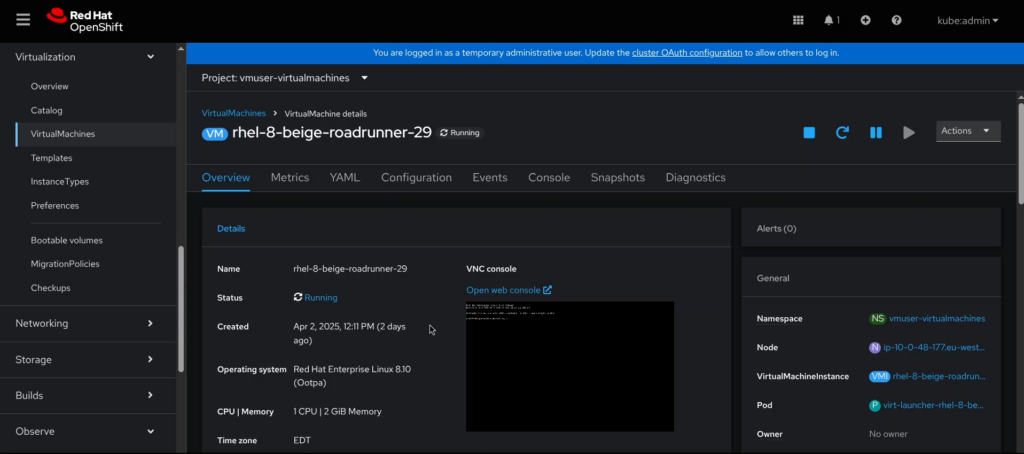
For migration from VMware, Red Hat offers the Migration Toolkit for Virtualization. It helps configure source and target environments, map networks and storage, plan the migration, and transfer workloads. Supported operating systems, networking features, and migration modes vary by version.
Best for: Organizations that already use OpenShift or plan a shared platform for VMs and containers, with common management processes across both.
Key considerations: Operating the platform requires Kubernetes and Red Hat OpenShift expertise. Check storage classes, networking, backup, and high availability. If most of your workloads are conventional VMs, compare costs and complexity with traditional hypervisors. For such VM-focused use cases, Red Hat also offers OpenShift Virtualization Engine.

Scale Computing SC//Platform
Scale Computing SC//Platform is a hyperconverged platform that combines virtualization, storage, and infrastructure management. It runs on SC//HyperCore, KVM-based software with integrated SCRIBE distributed storage, and supports HA clusters, automatic VM recovery, and centralized management.
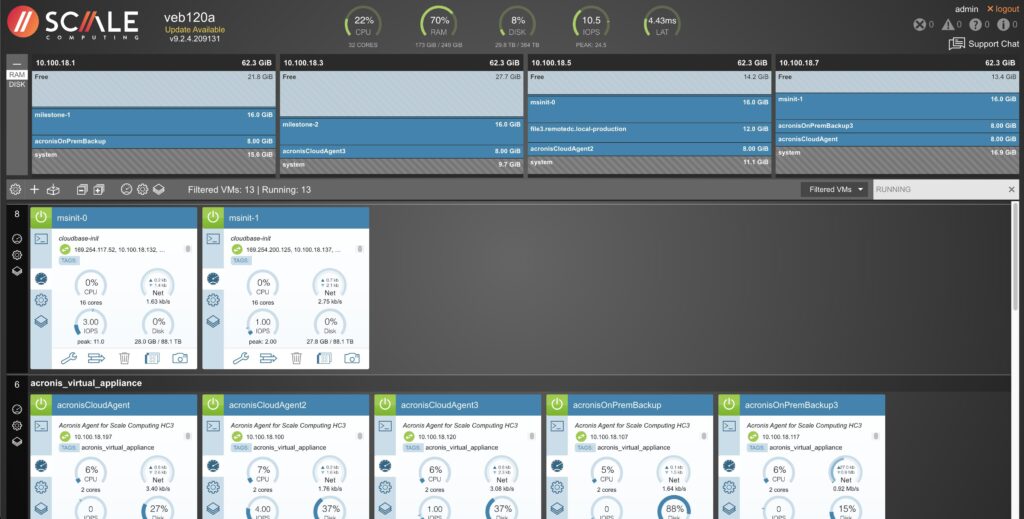
SC//HyperCore is available both in preconfigured hardware appliances and as a software subscription for compatible hardware. In 2026, Scale Computing added support for AMD EPYC 9004/9005 processors and announced AMD Ryzen support in the HyperCore 9.7 family.
Best for: Companies with branches, manufacturing sites, and edge locations where a small IT team maintains the virtual infrastructure. The platform can also give some existing hardware a second life: supported Dell VxRail generations 14–16, for example, can be reused with SC//HyperCore instead of VMware.
Key considerations: Before deployment, verify hardware, guest OS, networking, and backup compatibility. Also check cluster scalability and the features included in your license tier.
To move virtual machines from VMware, Scale offers two tools. SC//Migrate automates VM transfer and creation, while SC//Move uses replication for minimal-downtime cutovers.
How to Choose the Right VMware Alternative
With the main options covered, the next step is to narrow them down for your environment. Start with an inventory of your existing infrastructure and required features.
For a market overview, Gartner’s Magic Quadrant for Server Virtualization Platforms, published in September 2026, covers 17 server virtualization vendors, their strengths, and their limitations. The report maps the available solutions, but the right platform still depends on your own requirements. Compare candidates using these criteria:
Workload compatibility. List your operating systems, applications, virtual devices, and required features, including HA, live migration, snapshots, backup, storage integrations, and SDN. Pay particular attention to dependencies on vCenter, vSAN, and NSX.
Hardware requirements. Check whether your existing servers and storage are compatible with the target platform. Some solutions, including Nutanix AHV, support approved external storage arrays, which may reduce migration costs, although compatibility depends on hardware models and software versions. Also assess whether you need extra servers for management, redundancy, or temporary migration capacity.
Total cost of ownership (TCO). Compare licenses or subscriptions, support, implementation, VM migration, training, operations, and hardware upgrades over the same period, such as five years. Remember to include the time when both environments run in parallel.
Operations and independence. Assess the skills your staff needs, support availability, upgrade processes, automation, and how easily you could move to another platform in the future.
Once you have a shortlist, test two or three platforms with the same workload and record performance, HA behavior, backup recovery, and administrator effort. That way, your decision rests on measurements rather than vendor promises.
If you are planning to leave VMware, explore Cloudification’s VMware replacement solution, which compares platform capabilities and explains the migration approach. For architecture and capabilities, see c12n Private Cloud.
Migrating from VMware: What to Check Before Moving
Migrating a VM affects its disks, network settings, drivers, and related infrastructure services. Even if the target platform supports the same guest OS, disk conversion does not guarantee that the application will start correctly.
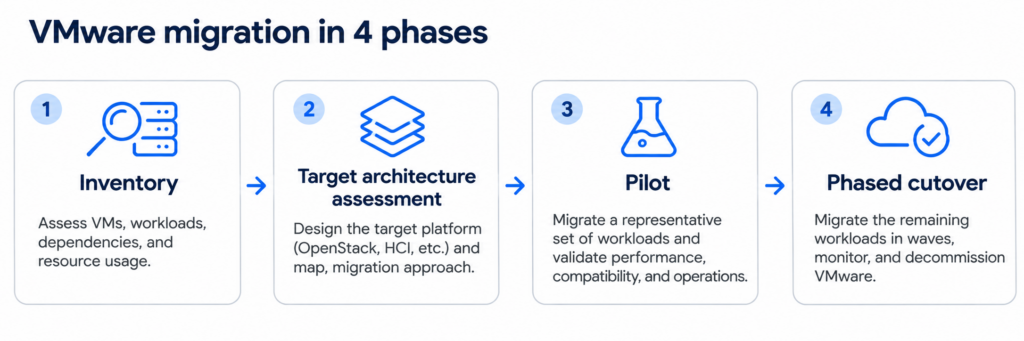
It helps to break the work into four stages:
Inventory. List your VMs, the VMware features they use, application dependencies, availability requirements, and acceptable downtime windows.
Target architecture assessment. Map networks and storage, and check backups, access, observability, and hardware compatibility. Prepare a rollback plan.
Pilot. Migrate a few representative systems and test application startup, performance, recovery, and administration procedures.
Phased cutover. Migrate workloads in groups, record test results, and define in advance the point after which rolling back would require data recovery or reverse synchronization.
For migration tools, see Cloudification’s Migrating from VMware to OpenStack.
Frequently Asked Questions About VMware Alternatives
Which Free VMware Alternative Is the Most Practical?
Free VMware alternatives include Proxmox VE, OpenStack, and Apache CloudStack. Proxmox VE suits traditional virtualization, while OpenStack offers broader private cloud capabilities, including automation, APIs, and self-service.
All three are open source, with no license fees for the core platform. Implementation, hardware, and operations still cost money, and commercial OpenStack solutions can simplify deployment and maintenance.
Can OpenStack Replace VMware vSphere?
Yes. OpenStack can replace VMware vSphere for most common virtualization tasks, such as running VMs and managing compute, networks, and storage. Some functions require additional components and integrations, and replacing the wider VMware stack means checking each product and service separately. See the feature comparison on the VMware vs. c12n.cloud page.
Can You Migrate from VMware Without Replacing Servers?
Often, yes, especially when moving to KVM-based platforms. Whether you can reuse your hardware depends on CPU, network adapter, and storage compatibility with the target architecture. Also check capacity for the migration itself, since running both environments in parallel may require temporary resources.
Which VMware Alternative Is Best for a Large Enterprise?
It depends on your architecture and operational model. Nutanix AHV is suited to enterprise virtualization and HCI, while OpenStack supports scalable private clouds with APIs and self-service. Proxmox VE can also run large enterprise clusters if its features and support options meet your requirements. In Microsoft environments, consider Hyper-V or Azure Local; if you need VMs alongside containers, consider OpenShift Virtualization.
Which VMware Alternative Should You Choose?
If you want to keep conventional VM infrastructure, start by comparing Proxmox VE and Hyper-V. For integrated HCI, consider Nutanix and Scale Computing, and for managing VMs alongside containers, evaluate OpenShift Virtualization. OpenStack suits organizations that need a private cloud with a flexible architecture, APIs, and self-service.
Whichever direction you take, compare features and TCO first, then pilot the platforms that fit. If you are considering OpenStack as a VMware replacement, explore c12n Private Cloud und Cloudification’s projects to see the infrastructure components and deployment options.


