



Best VMware Alternatives in 2026: Six Platforms Compared
As a result of Broadcom’s licensing changes, many businesses will want to review their current VMware expenditure and the available alternatives. Some may wish to find another solution to run their VMs on, with similar functionality to manage them all; others may want to create their own private cloud or run VMs alongside containers.
We have shortlisted 6 products: Proxmox VE, Nutanix AHV, Microsoft Hyper-V and Azure Local, OpenStack, Red Hat OpenShift Virtualization and Scale Computing. Each is considered in more detail below in terms of its features and suitable deployment scenarios, shortcomings and methods of migrating workloads. We also describe some factors to consider when choosing a product.
VMware Alternatives at a Glance
| Platform | Solution type | Best for | Key considerations |
|---|---|---|---|
|
Proxmox VE |
Open-source virtualization |
Cost-conscious VM infrastructure |
Linux expertise, storage design, and support planning
|
|
Nutanix AHV
|
Enterprise virtualization / HCI
|
Enterprise environments with integrated or external storage
|
Licensing costs, storage and hardware compatibility, vendor dependence
|
|
Microsoft Hyper-V / Azure Local
|
Hypervisor / hybrid HCI platform
|
Microsoft-based infrastructure
|
Product differences, licensing, and Azure connectivity requirements
|
|
OpenStack
|
Open-source private cloud / IaaS
|
Scalable cloud infrastructure with self-service and APIs
|
Deployment and operational complexity, component integration
|
|
OpenShift Virtualization
|
Kubernetes-based virtualization
|
Managing VMs and containers together
|
Kubernetes expertise and supported configurations |
|
Scale Computing |
KVM-based software HCI platform |
Virtualization for branches, edge, and distributed environments |
Hardware compatibility, scalability, and integration limitations |
It will depend on a combination of whether you’re currently running ESXi, vCenter, vSAN, NSX, various backup solutions and others. Just changing the underlying hypervisor may therefore not fulfill all of your requirements.
Why Are Companies Looking for VMware Alternatives?
From December 2023, Broadcom stopped selling perpetual licences for VMware products and moved to a subscription-only model. Current perpetual licenses would remain valid, subject to their terms regarding future upgrades and support (see Broadcom’s announcement). There were clearly implications for expected expenditure and timing to renew; we analyzed the impact in our post on VMware’s licensing changes under Broadcom.
There has been considerable activity in the market for alternatives to VMware. Gartner’s report of September 2026 is titled The Shift Toward VMware Alternatives: Mitigating Risks and Costs., concluding that Broadcom’s changes to VMware’s product portfolio, pricing and partner policies are accelerating customer migrations to other platforms.
Of course, licensing is not the only consideration: organizations also weigh reliance on a single vendor, location of data and degree of automation. Indeed, reviewing their use of VMware may prompt organizations to consider moving from managing individual clusters to a private cloud model.
VMware Replacement Strategies
The first choice to make would be whether you require predominantly VMs, with central management of all components. If so, you can switch to another virtualization or HCI platform, such as Proxmox VE, Hyper-V, Nutanix, or Scale Computing. The migration scope will then depend on your existing networking, storage, management tools, and so on.
OpenStack would provide much of the functionality available with a VMware installation, however, it is more a question of implementing and configuring an appropriate level of private cloud, providing features such as APIs, quotas and self-service to various consumers.
A further option would be to provide VMs under the control of Kubernetes, that is, OpenShift Virtualization. Obviously, Kubernetes does not itself support running VMs, so this relies on KubeVirt, and hence KVM and libvirt.
Alternatively, some or all could be moved to one or more public clouds, relieving you of much equipment in your own data center, although with significant implications for costs, network access, security, geographic considerations, and so on.
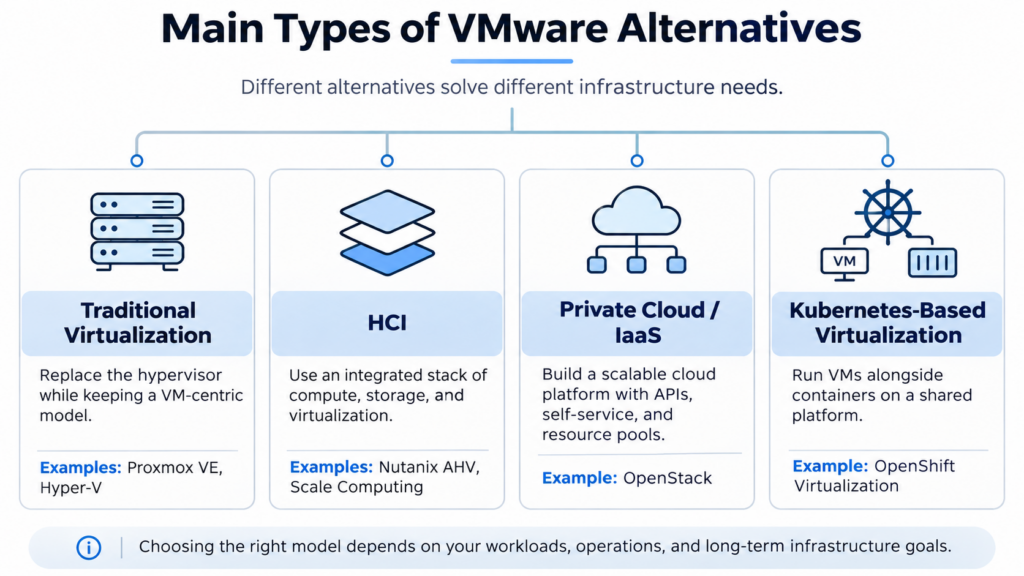
Top Six VMware Alternatives

Proxmox VE
Proxmox Virtual Environment is an open-source platform that combines KVM for virtual machines and LXC for containers. Administrators manage hosts and guests through a web interface, CLI, or API. The platform supports clustering, high availability, live migration, and built-in backups, and integrates with Proxmox Backup Server. For storage, you can use local disks, SAN/NAS, or Ceph.
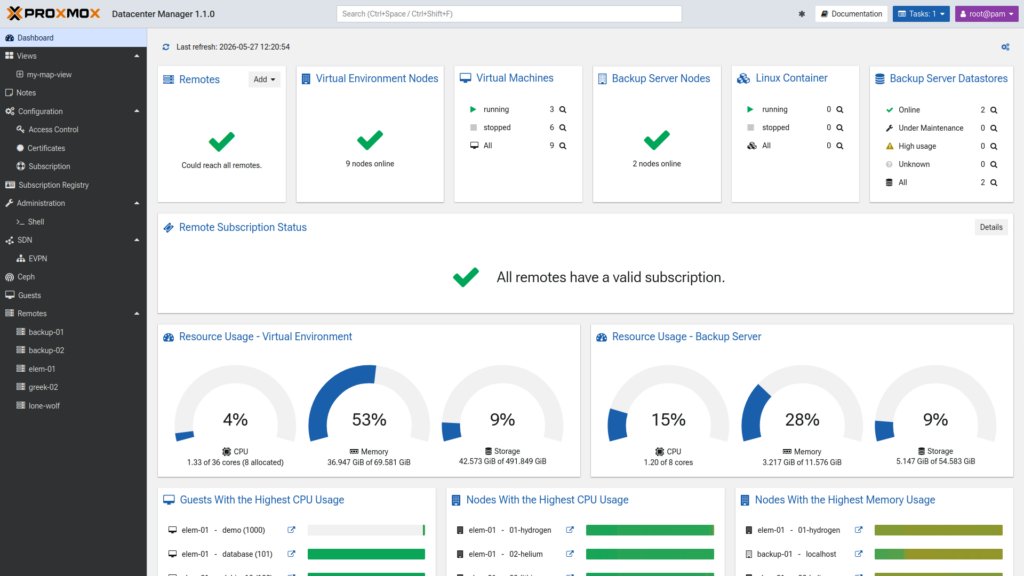
There is no software license to buy. A commercial subscription adds access to the enterprise repository and technical support. Other costs depend on your infrastructure and services.
Best for: Organizations that want VM-focused infrastructure, control over their hardware, and independence from VMware licensing. Proxmox is also an option for enterprise clusters, provided its capabilities meet your application and operational requirements.
Key considerations: Check how Proxmox integrates with your backup, monitoring, and network security tools. Keep in mind that Ceph and SDN do not automatically reproduce every vSAN or NSX capability. Your team will also need Linux and storage architecture expertise. For a detailed comparison, see Cloudification’s OpenStack vs Proxmox article.
For migration, Proxmox VE 8.2 introduced a built-in import wizard that moves virtual machines from VMware ESXi with most of their settings. Guest OS and virtual hardware compatibility still need to be checked beforehand.

Nutanix AHV
Nutanix AHV is the hypervisor in Nutanix Cloud Infrastructure, an enterprise virtualization platform. It supports HA clusters, live migration, and centralized management through Nutanix Prism. Nutanix Move helps transfer virtual machines from VMware to AHV.
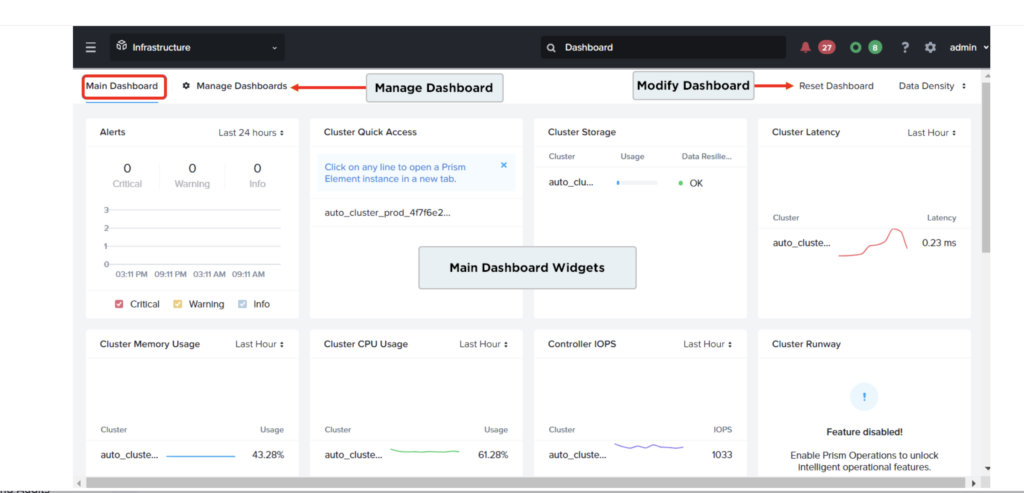
Nutanix has traditionally combined compute and storage on the same HCI nodes. Since 2025, however, the platform has also supported external storage systems, including Dell PowerFlex, Everpure FlashArray (formerly Pure Storage FlashArray), and Dell PowerStore. As a result, compute and storage can scale independently, and some organizations can keep their existing arrays when leaving VMware.
Best for: Companies that need enterprise virtualization with centralized management and commercial support. External storage support also makes Nutanix a good fit for organizations that want to retain part of their existing infrastructure.
Key considerations: External storage support is limited to specific models, software versions, and configurations, so verify hardware compatibility, replication, and disaster recovery before migrating. When estimating TCO, include Nutanix licensing, support, migration, and any infrastructure upgrades.

Microsoft Hyper-V and Azure Local
Hyper-V is Microsoft’s hypervisor, available as a Windows Server role. It supports Windows and Linux VMs, failover clusters, live migration, and management through Microsoft tools. Teams already working with Windows Server and Active Directory will find some administration procedures familiar.
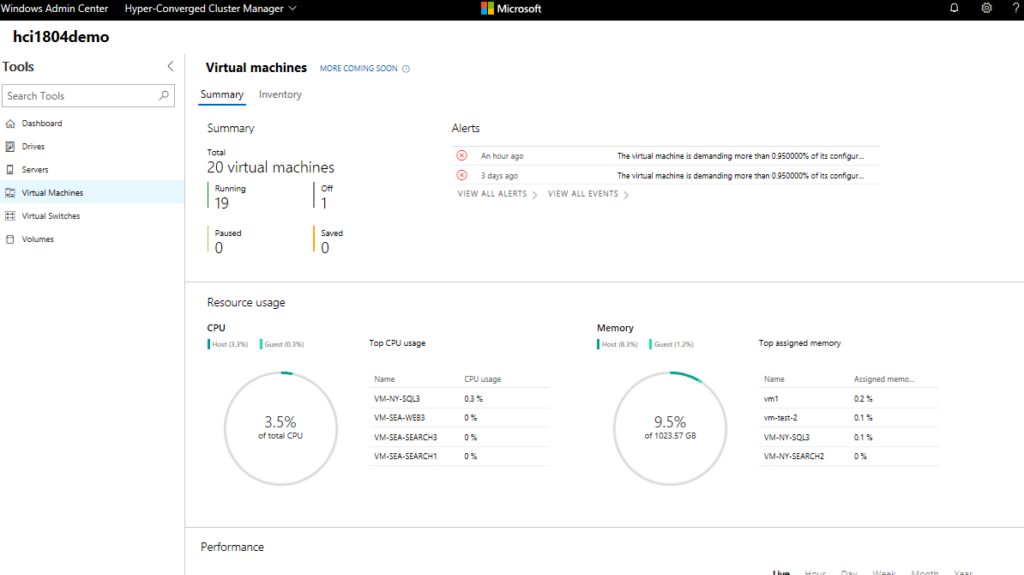
Azure Local, formerly Azure Stack HCI, is a separate HCI solution for on-premises and distributed sites. It combines Hyper-V, software-defined storage, clustering, and management with Azure Arc integration. Unlike a conventional Windows Server Hyper-V cluster, Azure Local has its own hardware and licensing requirements (see Microsoft’s documentation).
Best for: Organizations with predominantly Windows workloads, existing Microsoft licenses, and Windows Server specialists. If you need integrated HCI and hybrid management, Azure Local is worth evaluating separately.
Key considerations: Hyper-V and Azure Local are priced differently, so check Windows Server editions, guest OS licensing rights, Azure Local licensing, connectivity requirements, and supported servers. For Linux workloads, run a pilot and test your existing backup tools.
For migration to Hyper-V, System Center Virtual Machine Manager (SCVMM) can convert VMware VMs, with the source VM powered off. For Azure Local, Azure Migrate supports migration from VMware; this capability became generally available in October 2025.

Openstack
OpenStack is a collection of open source IaaS products which allow you to deploy and manage a private or public cloud (compute, network and storage). There are a number of main ‘projects’ within OpenStack, each responsible for a particular function. Nova controls the compute nodes, Neutron delivers the network functionality, Cinder exposes volume services, and Keystone is used for authentication. A number of other open-source software packages are often integrated into these, such as KVM for VMs, OVN for the network, and Ceph for the storage. Of course this will depend on your specific requirements.
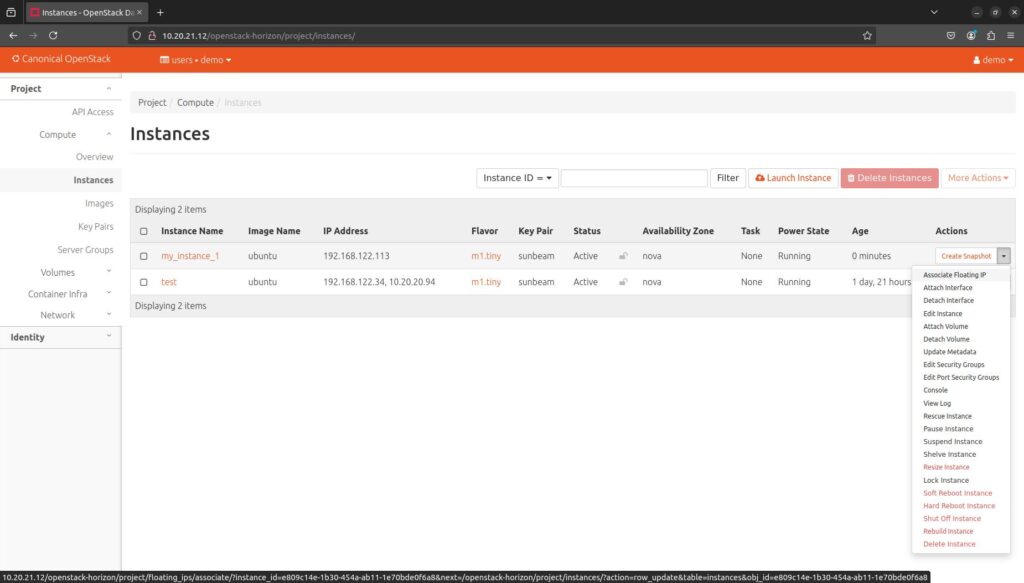
In addition, OpenStack provides APIs, quotas, tenancies and end-user self-service. Various features can be configured including high availability, VM hot-migration, tenant-defined virtual networks and compatibility with multiple storage backends. As such, OpenStack is capable of delivering most of the common VMware use cases and adding a private cloud with automated provisioning and scaling. Obviously you will need to identify equivalent functionality when moving away from VMware and select the right integrations.
Since 2010, OpenStack has grown to become a widely-used technology across many industries. It is used by enterprises, cloud providers and telecommunications companies, and backed by a global ecosystem of developers, integrators and support providers, making it suitable for demanding availability and scalability requirements.
Best for: Organizations looking to establish or extend their cloud offering(s), either internally or externally, with control over architecture, automation and data location. The benefits of using open source (Apache) and industry-standard protocols mean you are not beholden to any one provider or its licensing policies.
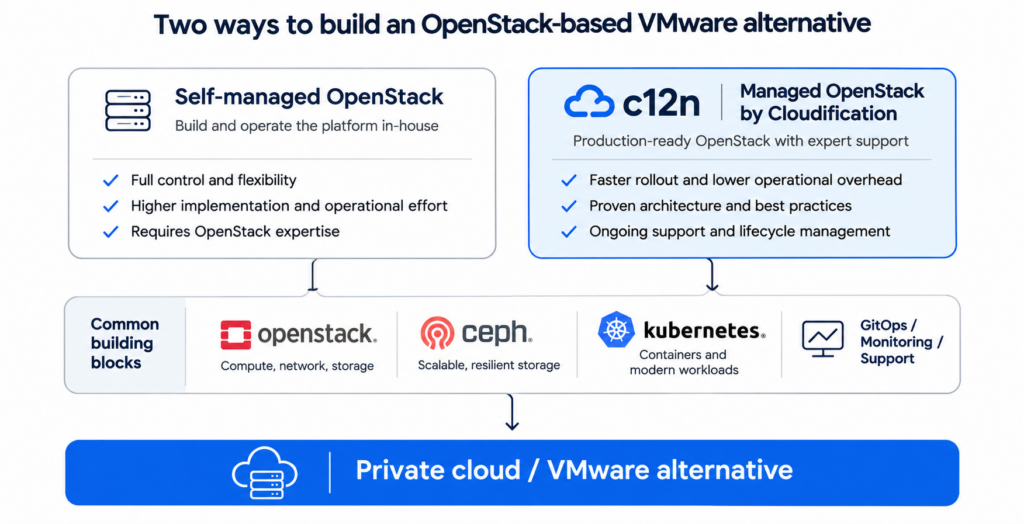
Key considerations: If you run it yourself, you will require a skilled team to administer, operate and maintain your OpenStack cloud. This includes activities such as health-checking, data protection, upgrades and finding external support. There are several options to facilitate the transition from VMware to OpenStack: virt-v2v, MigrateKit and Coriolis. All of these are covered in detail by Cloudification in its article Migrating from VMware to OpenStack.
Alternatively, you can leverage Cloudification’s c12n Private Cloud solution, which integrates OpenStack, K8s and Ceph along with comprehensive monitoring, observability and GitOps workflows. Clients are provided a turn-key private cloud and can elect to engage Cloudification to provide a commercial support contract (including optional 24×7 support). Crucially, because the solution is based on open source technologies and the client retains the configuration files, they continue to retain control of the system and are free to bring in other providers or build in-house.
You can learn more about c12n as a VMware alternative, including feature comparisons and the migration approach, on a separate page.
Cloudification Case Studies
VMware-to-OpenStack Migration for FinTech
One client, a FinTech firm based in Asia, replaced its VMware clusters with a c12n-based (i.e. OpenStack/Kubernetes) private cloud running both Linux and Windows. Ceph, automation and monitoring form part of this offering. Read the VMware-to-OpenStack migration case study
Multi-Data-Center VMware & OpenShift Replacement
A further client, a major German healthcare organization, had Cloudification deploy a distributed OpenStack and Kubernetes environment across 3 sites. The aim is to supersede their current VMware and OpenShift platforms. Read the Multi-Data-Center Private Cloud case study.

Red Hat OpenShift Virtualization
Red Hat OpenShift Virtualization runs virtual machines on OpenShift alongside containerized applications. It is built on KubeVirt, which uses KVM and libvirt and integrates VM management into Kubernetes. As a result, administrators can define infrastructure declaratively and use the automation tools they already know.
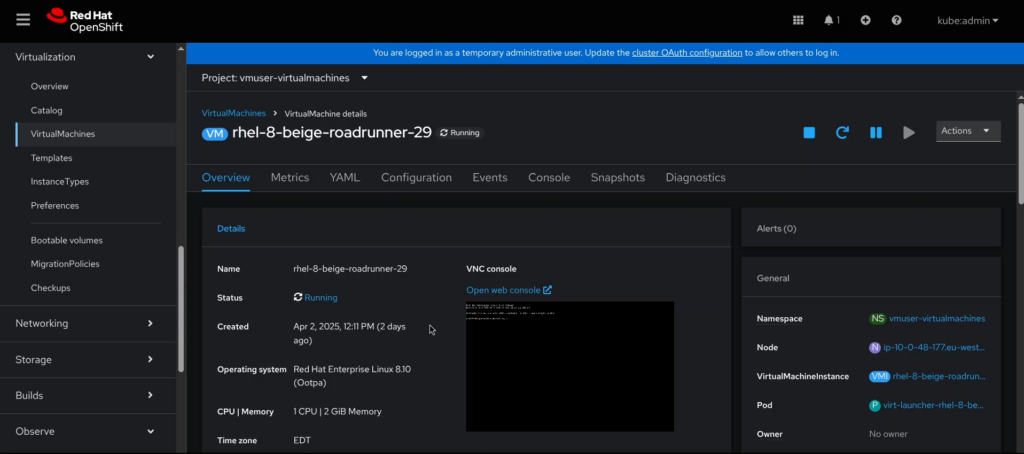
For migration from VMware, Red Hat offers the Migration Toolkit for Virtualization. It helps configure source and target environments, map networks and storage, plan the migration, and transfer workloads. Supported operating systems, networking features, and migration modes vary by version.
Best for: Organizations that already use OpenShift or plan a shared platform for VMs and containers, with common management processes across both.
Key considerations: Operating the platform requires Kubernetes and Red Hat OpenShift expertise. Check storage classes, networking, backup, and high availability. If most of your workloads are conventional VMs, compare costs and complexity with traditional hypervisors. For such VM-focused use cases, Red Hat also offers OpenShift Virtualization Engine.

Scale Computing SC//Platform
Scale Computing SC//Platform is a hyperconverged platform that combines virtualization, storage, and infrastructure management. It runs on SC//HyperCore, KVM-based software with integrated SCRIBE distributed storage, and supports HA clusters, automatic VM recovery, and centralized management.
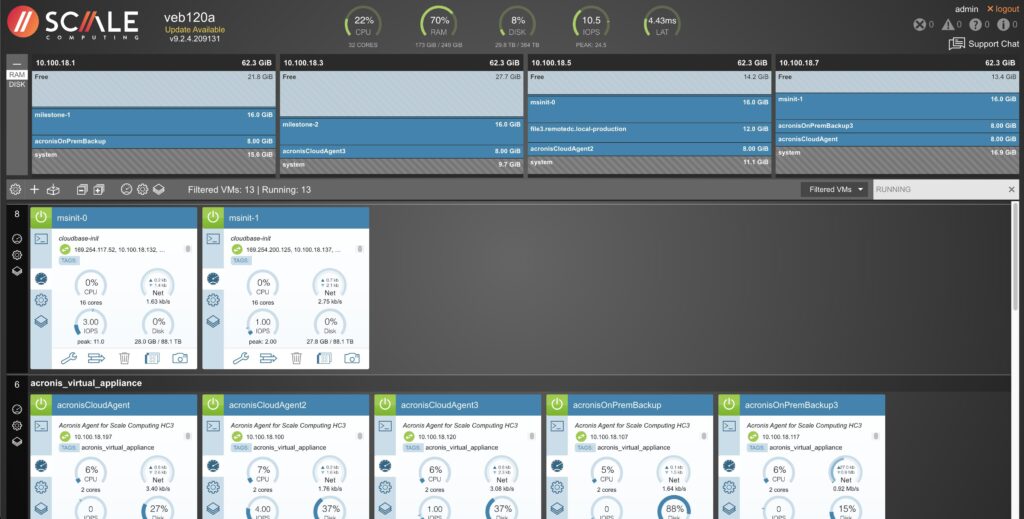
SC//HyperCore is available both in preconfigured hardware appliances and as a software subscription for compatible hardware. In 2026, Scale Computing added support for AMD EPYC 9004/9005 processors and announced AMD Ryzen support in the HyperCore 9.7 family.
Best for: Companies with branches, manufacturing sites, and edge locations where a small IT team maintains the virtual infrastructure. The platform can also give some existing hardware a second life: supported Dell VxRail generations 14–16, for example, can be reused with SC//HyperCore instead of VMware.
Key considerations: Before deployment, verify hardware, guest OS, networking, and backup compatibility. Also check cluster scalability and the features included in your license tier.
To move virtual machines from VMware, Scale offers two tools. SC//Migrate automates VM transfer and creation, while SC//Move uses replication for minimal-downtime cutovers.
How to Choose the Right VMware Alternative
Start by listing your current facilities and desired functionality, then narrow down the possibilities applicable to your situation.
There are a wide range of products on the market. The September 2026 Gartner Magic Quadrant for Server Virtualization Platforms reviews 17 different suppliers, highlighting each company’s positive aspects and weaknesses. This is a useful guide to the products available, but obviously you will want a solution to meet your specific needs. Some key factors when comparing different products:
Workload compatibility. List your operating systems, applications, virtual devices, and required features, including HA, live migration, snapshots, backup, storage integrations, and SDN. Pay particular attention to dependencies on vCenter, vSAN, and NSX.
Hardware requirements. Check whether your existing servers and storage are compatible with the target platform. Some solutions, including Nutanix AHV, support approved external storage arrays, which may reduce migration costs, although compatibility depends on hardware models and software versions. Also assess whether you need extra servers for management, redundancy, or temporary migration capacity.
Total cost of ownership (TCO). Compare licenses or subscriptions, support, implementation, VM migration, training, operations, and hardware upgrades over the same period, such as five years. Remember to include the time when both environments run in parallel.
Operations and independence. Assess the skills your staff needs, support availability, upgrade processes, automation, and how easily you could move to another platform in the future.
Once you have a shortlist, test two or three platforms with the same workload and record performance, HA behavior, backup recovery, and administrator effort. That way, your decision rests on measurements rather than vendor promises.
If you are planning to leave VMware, explore Cloudification’s VMware replacement solution, which compares platform capabilities and explains the migration approach. For architecture and capabilities, see c12n Private Cloud.
Migrating from VMware: What to Check Before Moving
Any migration would involve at least the VM’s disks, networking, drivers and other supporting services. There is also no assurance that any particular application will successfully start after disk conversion, even to an identical guest OS type.
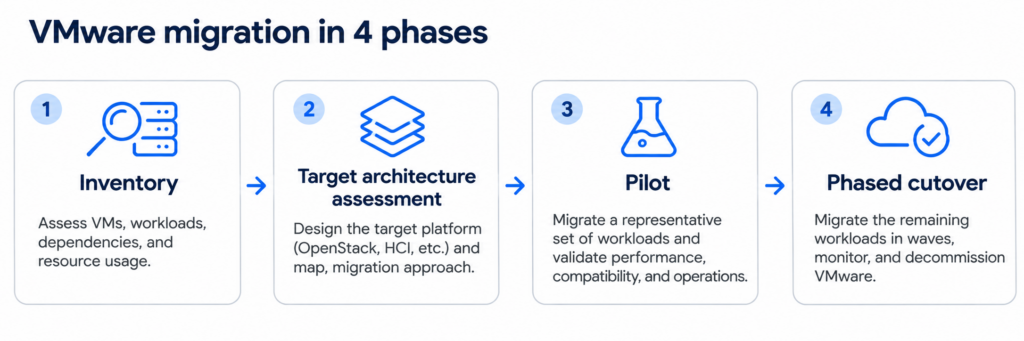
As a guide, there are four stages involved:
Inventory. List your VMs, the VMware features they use, application dependencies, availability requirements, and acceptable downtime windows.
Target architecture assessment. Map networks and storage, and check backups, access, observability, and hardware compatibility. Prepare a rollback plan.
Pilot. Migrate a few representative systems and test application startup, performance, recovery, and administration procedures.
Phased cutover. Migrate workloads in groups, record test results, and define in advance the point after which rolling back would require data recovery or reverse synchronization.
For migration tools, see Cloudification’s Migrating from VMware to OpenStack.
Frequently Asked Questions About VMware Alternatives
Which Free VMware Alternative Is the Most Practical?
Free VMware alternatives include Proxmox VE, OpenStack, and Apache CloudStack. Proxmox VE suits traditional virtualization, while OpenStack offers broader private cloud capabilities, including automation, APIs, and self-service.
All three are open source, with no license fees for the core platform. Implementation, hardware, and operations still cost money, and commercial OpenStack solutions can simplify deployment and maintenance.
Can OpenStack Replace VMware vSphere?
Yes. OpenStack can replace VMware vSphere for most common virtualization tasks, such as running VMs and managing compute, networks, and storage. Some functions require additional components and integrations, and replacing the wider VMware stack means checking each product and service separately. See the feature comparison on the VMware vs. c12n.cloud page.
Can You Migrate from VMware Without Replacing Servers?
Often, yes, especially when moving to KVM-based platforms. Whether you can reuse your hardware depends on CPU, network adapter, and storage compatibility with the target architecture. Also check capacity for the migration itself, since running both environments in parallel may require temporary resources.
Which VMware Alternative Is Best for a Large Enterprise?
It depends on your architecture and operational model. Nutanix AHV is suited to enterprise virtualization and HCI, while OpenStack supports scalable private clouds with APIs and self-service. Proxmox VE can also run large enterprise clusters if its features and support options meet your requirements. In Microsoft environments, consider Hyper-V or Azure Local; if you need VMs alongside containers, consider OpenShift Virtualization.
Which VMware Alternative Should You Choose?
If you want to keep conventional VM infrastructure, start by comparing Proxmox VE and Hyper-V. For integrated HCI, consider Nutanix and Scale Computing, and for managing VMs alongside containers, evaluate OpenShift Virtualization. OpenStack suits organizations that need a private cloud with a flexible architecture, APIs, and self-service.
Whichever direction you take, compare features and TCO first, then pilot the platforms that fit. If you are considering OpenStack as a VMware replacement, explore c12n Private Cloud and Cloudification’s projects to see the infrastructure components and deployment options.


