



High-Performance LLM Infrastructure with Kubernetes and vLLM on Private Cloud
Have you ever chatted with a bot that seemed to think for a long time before replying? Or maybe you have tried running a large language model (LLM) yourself, only to see your GPU memory run out after just a few test prompts. You are not alone. Behind many popular AI applications – from chatbots to code assistants and agents there is a quiet revolution happening in how models are served and the infrastructure behind. That revolution is called vLLM, and when combined with a private cloud, it changes everything.
This article explains vLLM private cloud deployment in simple, example-driven steps. You will learn what vLLM is, why traditional inference wastes so much memory, how PagedAttention fixes it, and why running vLLM on a private cloud gives you speed, security and data sovereignty. (Learn why data sovereignty is essential in 2026 in this article).

What Exactly Is vLLM?
Think of an LLM as a very fast, very large prediction engine. When you ask a question, the model does not answer in one go. Instead, it generates one word (or “token”) at a time, looping through its neural network once per token. A 500-word answer means 500 passes through the model. Now imagine a hundred users doing that simultaneously. Traditional serving methods struggle, slow down, and waste expensive GPU memory.
vLLM (Virtual Large Language Model) is an open-source inference library initially developed at UC Berkeley’s Sky Computing Lab. It has rapidly grown into a community-driven project with over 1,000 contributors and tens of thousands of daily downloads. Companies like AWS, LinkedIn, Meta, and Snowflake use vLLM to serve models efficiently.
Simple analogy: If traditional LLM serving is like a single cashier at a supermarket who serves one customer completely before moving to the next, vLLM is like a team of cashiers who handle many customers at once, dynamically opening and closing registers as needed.
vLLM Architecture
The diagram below, taken from the paper “Efficient Memory Management for Large Language Model Serving with PagedAttention”, shows how vLLM organizes its brain (the scheduler) and its workers (GPUs) to serve LLMs efficiently.
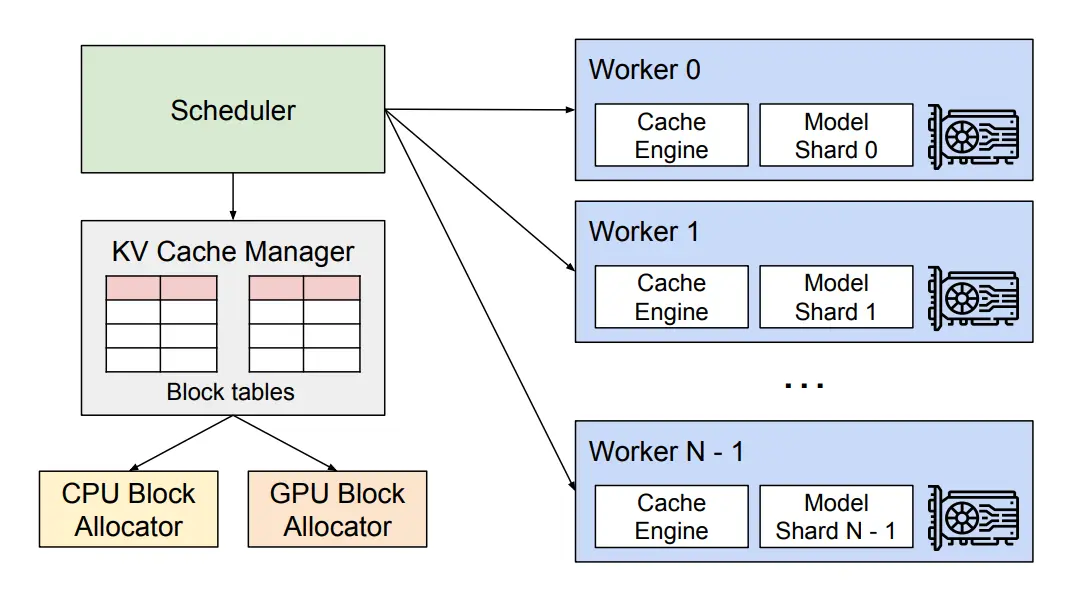
Let’s break it down:
The Centralized Scheduler
At the top of the figure, you will see a component called the centralized scheduler. It receives all incoming user requests and decides which GPU worker does what, and when. This scheduler contains a special component called the KV cache manager – the heart of vLLM’s memory magic.
The KV Cache Manager
The KV cache manager is responsible for all memory allocations. It does not matter whether the memory lives on the fast GPU (called “physical blocks on GPU workers”) or on the slower CPU RAM (“CPU block allocator”). The manager keeps a single, unified map that translates logical memory addresses (what the model thinks it needs) into physical memory addresses (where the data actually sits). This is exactly like how your computer’s operating system maps virtual memory to physical RAM.
GPU Workers
In the lower part of the figure, you will see multiple GPU workers (typically 4-8 in a single server). Each worker stores only a portion of the full KV cache – specifically, the parts needed for its assigned “attention heads” in the model. This is a form of tensor parallelism, where different GPUs hold different slices of the same model. All workers share the same mapping from logical to physical blocks, so they stay perfectly synchronized.
The CPU Swap Space
One of the cleverest features shown in the diagram is the CPU block allocator. When the GPU runs out of free physical blocks for new tokens, vLLM does not crash. Instead, it selects a set of ongoing sequences (requests) to evict. It transfers their KV cache from fast GPU memory to slower CPU RAM – like moving rarely used files from an SSD to a hard drive. Once a preempted sequence’s blocks are moved to CPU, vLLM stops accepting new requests until those sequences are completed and their blocks are freed.
When a request finishes, its GPU blocks are freed. Then, vLLM brings back the evicted blocks from CPU RAM back to the GPU, and resumes processing that sequence.
Important: The diagram also shows that the number of blocks swapped to CPU RAM never exceeds the total physical blocks in GPU RAM. This means the “swap space” on CPU is automatically bounded by the GPU memory allocated for KV cache – no runaway memory usage.
Why Architecture Matters
Without such design, if your GPU ran out of memory, your entire inference server would crash or start dropping requests. With vLLM’s paged architecture and CPU swap, the system gracefully degrades – it slows down (because moving to CPU is slower) but it does not fail. This is critical for production workloads where uptime and stability matters more than peak speed.
The Three Core Problems vLLM Solves
To understand why vLLM matters, let us look at three real pain points.
1. The Memory Waste Problem (KV Cache Fragmentation)
To understand why vLLM matters, let us look at three real pain points.
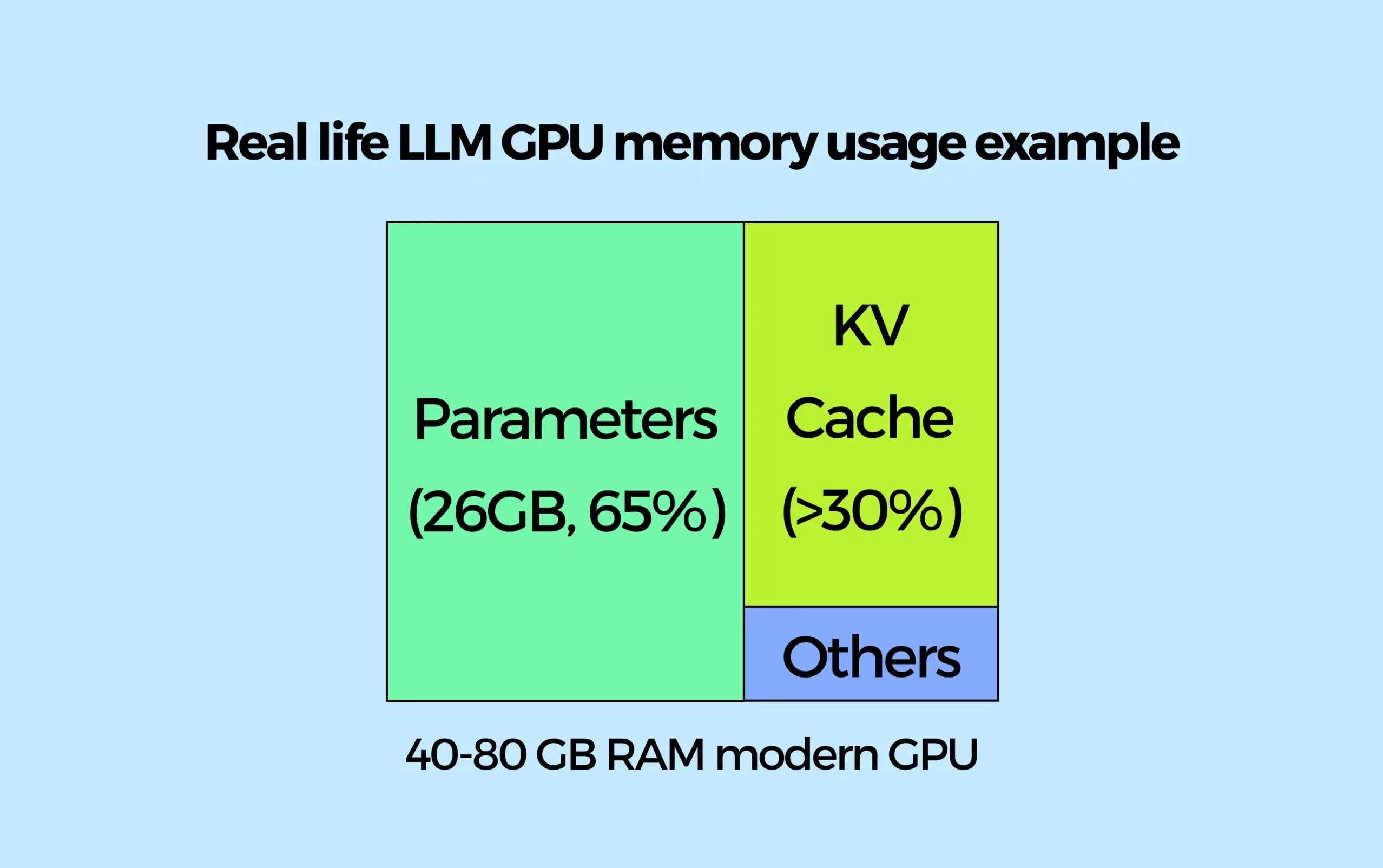
When an LLM generates a response, it stores intermediate calculations – called keys and values (KV) – for each token it has already processed. This is like a “memory scratchpad.” Without it, the model would have to re-read the entire conversation history for every new word, which would be unacceptably slow.
However, this KV cache consumes GPU memory. Traditional inference frameworks often pre-allocate GPU memory for the worst-case scenario. For example, if a model could generate 4,000 tokens, the system reserves space for 4,000 tokens – even if the actual answer is only 50 tokens long. This is like renting a huge moving truck for a single backpack. According to community benchmarks, this fragmentation can waste 50–80% of GPU memory in the worst case. That means your expensive, high-end GPU is mostly holding empty space in memory.
Visual example: Imagine a library where each reader (user request) gets a desk. Because the librarian does not know how many books (tokens) they will need, every reader gets a desk that can hold 100 books – even though most only read 5-10. That is 90% or more wasted space.
vLLM solution: It uses a technique called PagedAttention, inspired by how operating systems manage virtual memory. Instead of allocating one large, contiguous block of memory per request, vLLM divides the KV cache into small, fixed-size pages (e.g., 16 tokens per page). These pages are allocated on demand, only when needed.
Continuing the library analogy: Now, each reader gets a small shelf that holds exactly 16 books (a page). When they need more, you add another shelf. No wasted space. The same library suddenly fits 5 times more readers.
In traditional systems, memory utilization often sits at 20-30%. With PagedAttention, it jumps to 90% or more. That is a huge improvement that can save some hardware budget.
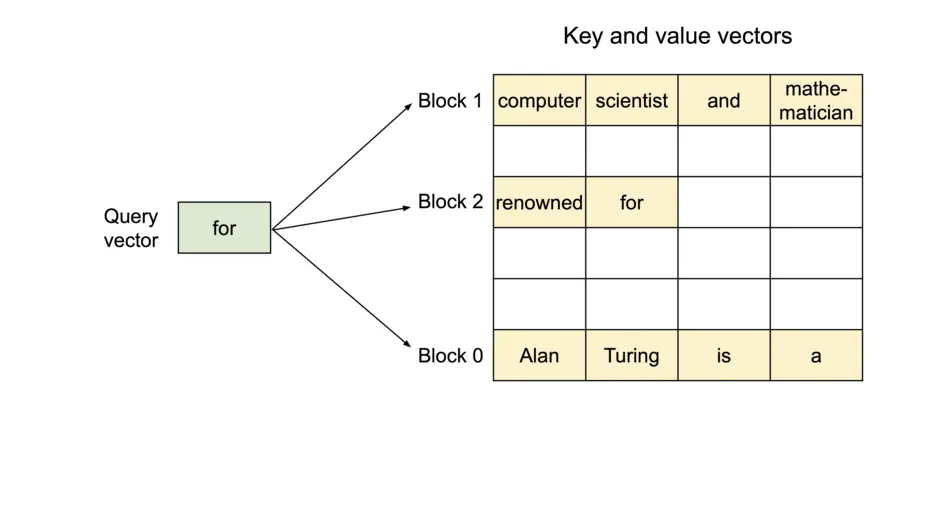
As shown in the image above, the PagedAttention kernel addresses fragmentation by storing KV blocks non-contiguously. During attention computation, the query vector (“forth”) multiplies with key vectors from each block (e.g., Block 0: “Four score and seven”) to compute attention scores, then multiplies those scores with value vectors to produce the final output. This allows KV blocks to reside in non‑contiguous physical memory, enabling more flexible paged memory management.

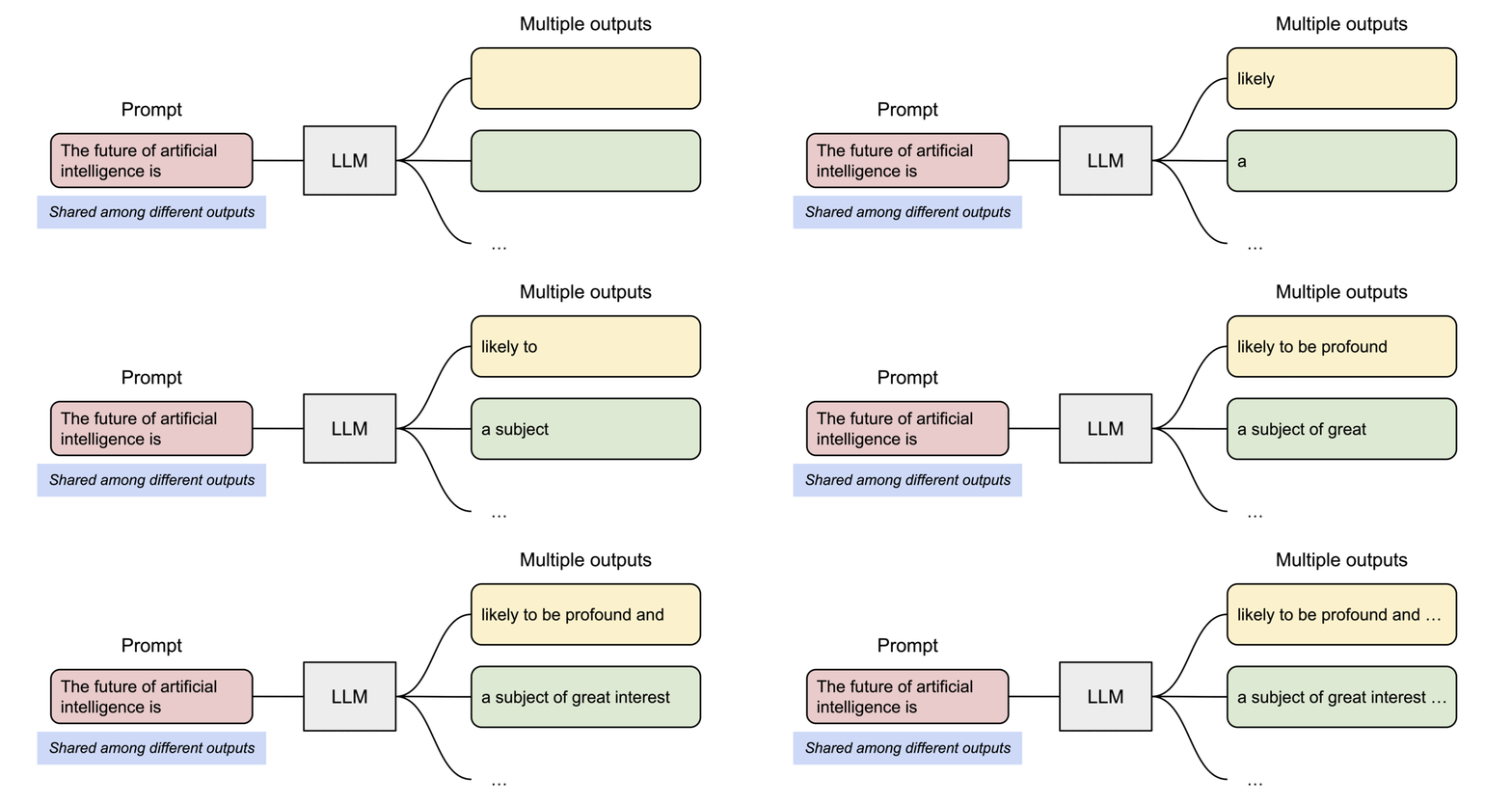
PagedAttention also enables efficient memory sharing. For instance, when generating multiple output sequences in parallel from the same prompt, the prompt’s computation and memory can be reused across all sequences as demonstrated below.
2. The Memory Waste Problem (KV Cache Fragmentation)
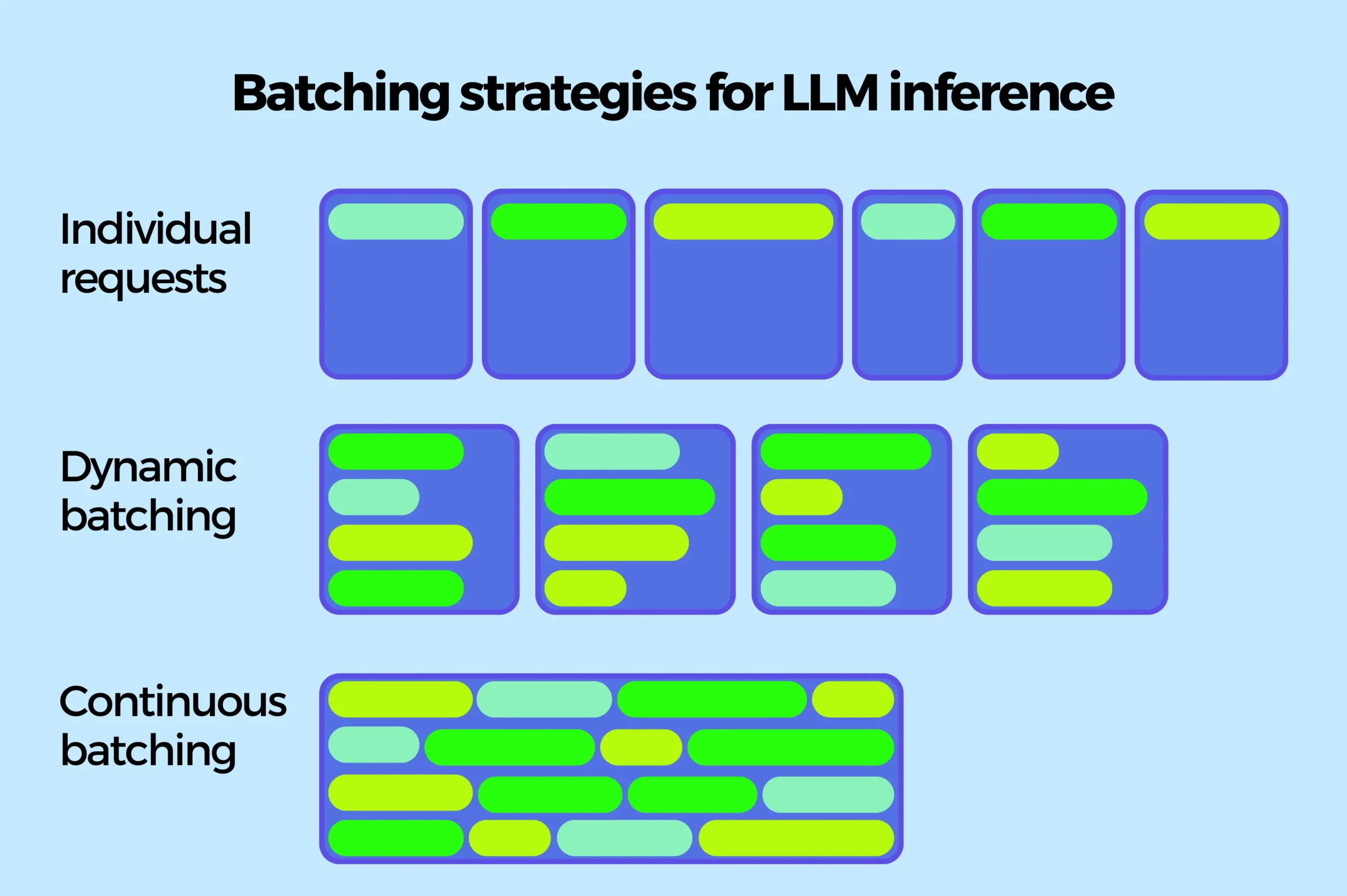
Without batching, each user request is processed one after another. If one request takes 5 seconds, ten users wait up to 50 seconds sequentially.
vLLM solution: Continuous batching. Unlike dynamic batching, which idles while waiting for the longest response in a batch to finish, continuous batching adds new requests to the GPU as soon as a previous request completes a generation step. This keeps the GPU constantly busy, dramatically increasing throughput..
A nuance: generating the first token (prefill) is compute-bound and takes longer than subsequent tokens. However, next-token prediction dominates overall request cost, so continuous batching focuses optimization there.
The result: massively increased throughput while meeting ambitious latency targets.
3. Redundant Computation (Repeating the Same Work)
Imagine two users asking: “What is the capital of Germany?” and “What is the capital of France?” The shared prefix “What is the capital of” is processed twice in traditional systems.
vLLM solution: vLLM detects and reuses common prefixes across different queries. If two users ask questions that start with the same phrase, that phrase is processed only once. This is especially valuable for chatbots that use long system prompts.
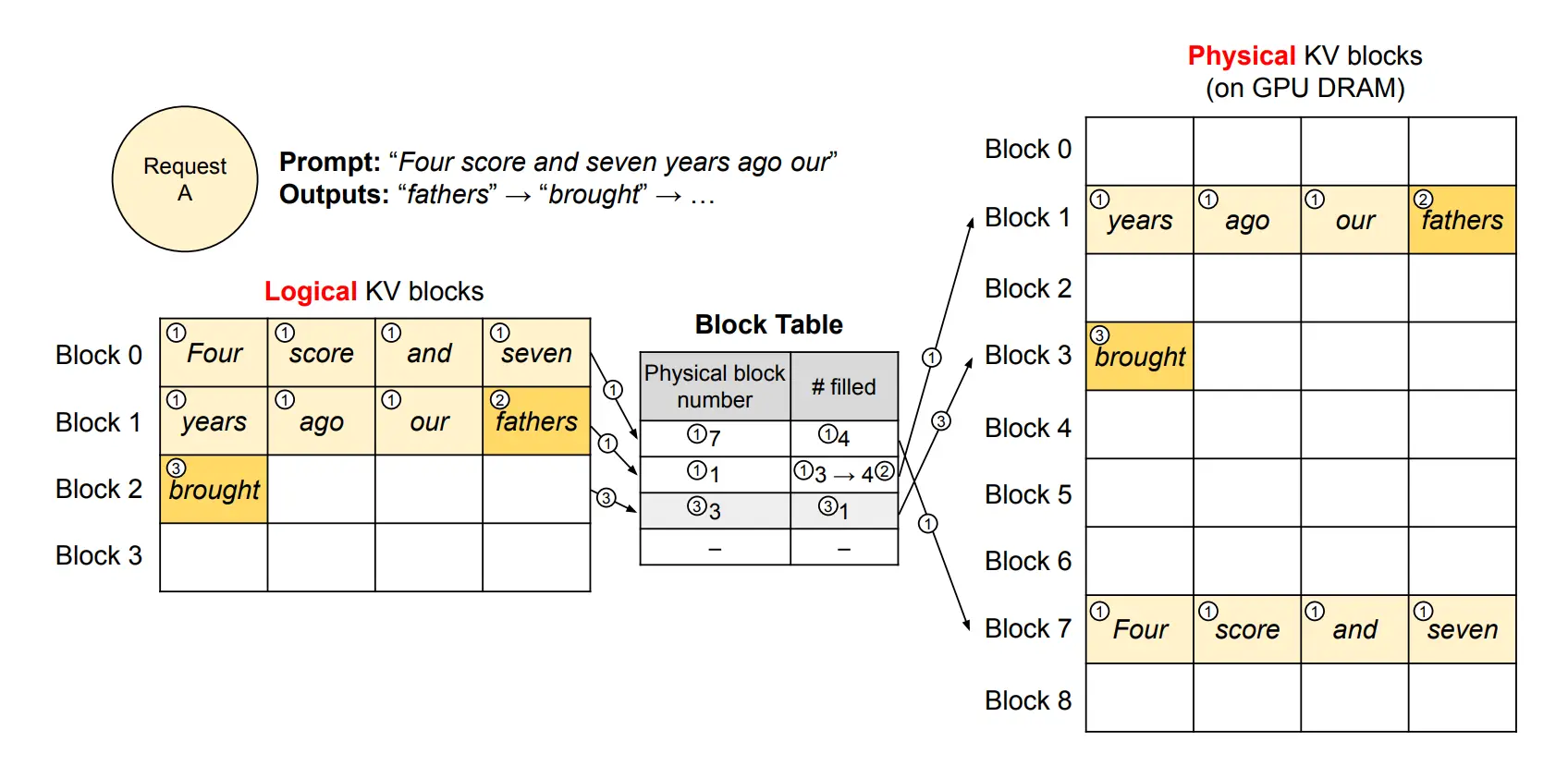
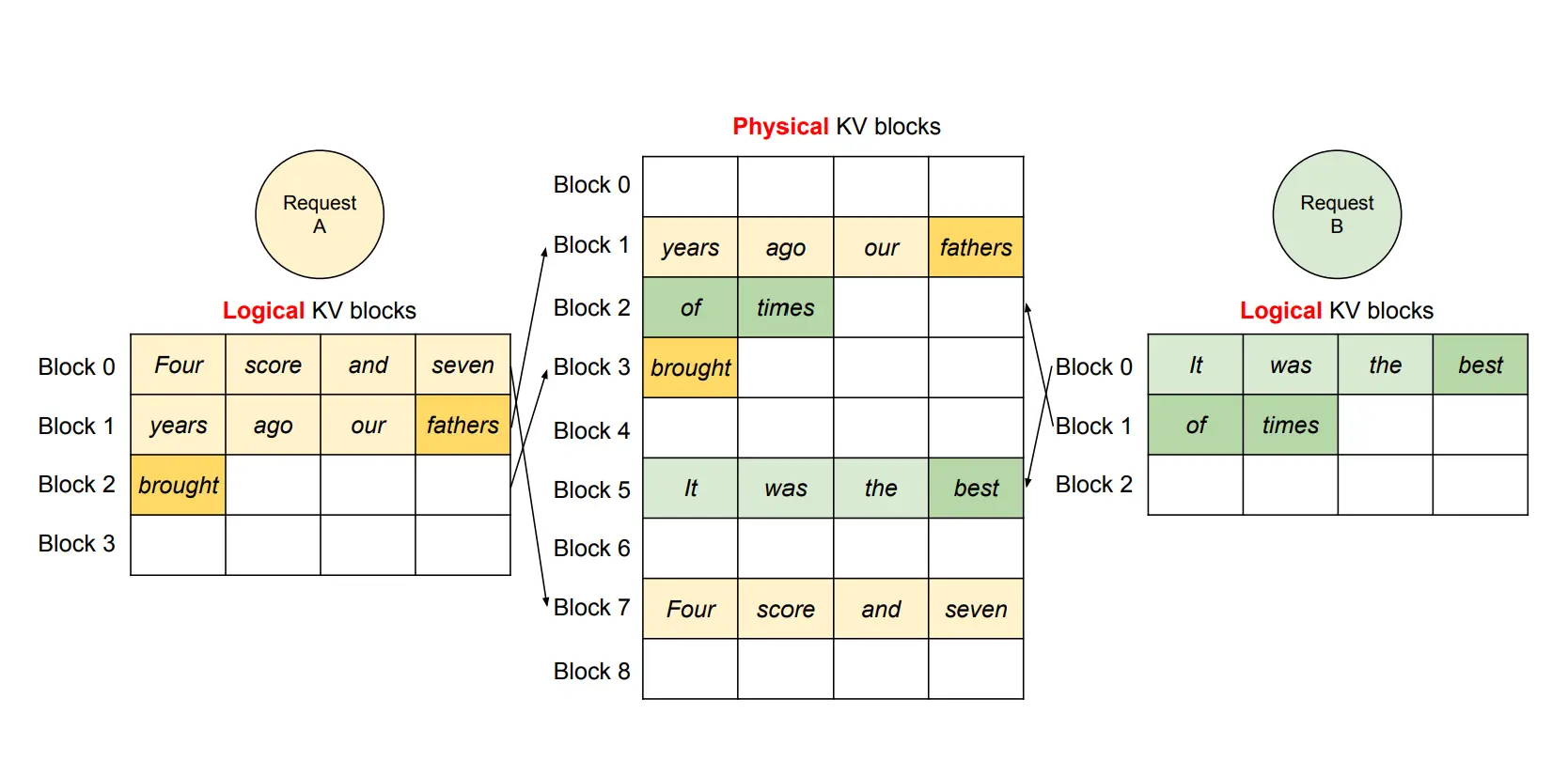
The image above illustrates how vLLM handles memory during decoding using PagedAttention. Instead of storing all tokens in a single continuous region, the KV cache is divided into fixed-size logical blocks. These blocks are mapped to physical GPU memory on demand, allowing non-contiguous allocation and avoiding fragmentation.
Each block is uniquely defined not only by its own tokens but also by the prefix leading up to it. For example, consider the sequence: “The sun dipped below the horizon as the city lights began to glow.” The first block might store “The sun dipped below,” while the next block is identified by both its own content (“the horizon as the city”) and the preceding prefix. This chaining ensures that identical prefixes across different requests can be recognized and reused.
This design is what enables efficient prefix caching: when multiple requests share the same beginning, they can reference the same KV blocks in memory instead of recomputing them. As a result, vLLM avoids redundant work and significantly improves throughput, especially in workloads with repeated prompts or long system prefixes.
How Much Faster? Real Numbers
In benchmarks, vLLM has demonstrated up to 24 times higher throughput compared to the popular Hugging Face Transformers libraries and a now retired TGI (Text Generation Inference). This is not a small improvement – it is the difference between a prototype that crashes under load and a production service that handles hundreds of users on the same hardware.
| Metric | Naive Hugging Face | vLLM |
|---|---|---|
|
Throughput (tokens/sec) |
~50 |
~1,200 (24x higher) |
|
Memory utilization |
~20% (80% wasted) |
~95% |
|
Concurrent users on same GPU |
~4 |
~20+ |
*Based on community-run benchmarks with similar model sizes.
What Makes vLLM Different from Other Inference Engines?
There are other tools like Llama.cpp, TensorRT-LLM, and SGLang. Each has strengths. vLLM shines when you need high throughput for multiple concurrent users on a limited set of GPUs.
| Inference Engine | Best For | Key Trade-off |
|---|---|---|
|
vLLM |
High-throughput GPU serving, many concurrent users |
Requires GPU, less optimized for CPU |
|
Llama.cpp |
Running on CPU or consumer laptops |
Lower throughput, but no GPU needed |
|
TensorRT-LLM |
NVIDIA-specific maximum performance |
Vendor lock-in, complex optimization |
|
Hugging Face (naive) |
Simplicity, prototyping |
Very low throughput, high waste |
Rule of thumb: If you are serving an LLM to more than one person at a time on a GPU, vLLM is likely your best choice.
Hardware and Community Support
vLLM works on NVIDIA and AMD GPUs, Google TPUs, Intel Gaudi, AWS Neuron, and even CPUs (though GPUs are highly recommended for production). The project is permissively licensed (Apache 2.0), and its GitHub repository is actively maintained with regular improvements. There are also community meetups, office hours, and events where developers share deployment tips. With over 75.000 stars on GitHub today it is fair to say that vLLM is the most popular framework for efficient inference.
Why Run vLLM on a Private Cloud? 💙
Running vLLM locally on your laptop is great for development. But for a real production – say, a customer support chatbot for a bank or a code assistant for your engineering team – you need a secure infrastructure with GPUs.
A private cloud be such an infrastructure with a dedicated pool of servers, storage, and networking that your organization controls entirely. It sits behind your firewall. No data leaves your data center and no surprise public cloud bills at the end of the month.
Cloudification’s c12n-Private-Cloud. is a 100% open-source platform that automates the entire infrastructure. It combines:
- OpenStack for virtual machines and bare metal.
- Kubernetes (via Gardener) for container orchestration.
- Ceph for software-defined storage.
- GitOps (ArgoCD) for declarative, version-controlled deployments.
With c12n, a production-ready vLLM cluster can be deployed in a day. Prerequisites are a few:
- A running Kubernetes cluster (in our case provisioned via Gardener on VMs)
- NVIDIA Kubernetes Device Plugin (aka k8s-device-plugin)
- One or multiple GPUs in the cluster (can be pass-through or vGPU/MIG)
- Optionally: an S3-compatible object storage (in c12n provided by Ceph)
- Helm to deploy the vLLM chart into K8s
Example: Running a Fine-Tuned Mistral 7B Chatbot
Imagine you have fine-tuned a Mistral 7B model on your company’s support tickets. Here is how vLLM on c12n changes the math:
- Without vLLM: Each chat session reserves 4 GB of GPU memory (worst-case scenario). A single 40 GB GPU thus can handle only 10 concurrent sessions. In case of a peak or support requests, the sessions might fail or queue for long if there are not enough GPUs in your cluster.
- With vLLM: PagedAttention reduces memory waste. Each session uses ~2 GB on average. The same GPU handles 20 concurrent sessions comfortably. Continuous batching would allow even more sessions per GPU with slight queuing but no failures. The OpenAI-compatible API means your existing chatbot code works without changes.
And if you are running on a private cloud, all customer conversation data remains inside your own data center making it easier to comply with GDPR, HIPAA, DORA or other regulations.
Why Cloudification’s c12n Could be Your Partner for your Private LLM Journey
You might be thinking: “This sounds great, but I am not a Kubernetes or a DevOps expert.” That is exactly why c12n exists.
Our c12n.cloud is designed to be turnkey cloud solution, that is also AI-ready:
- 100% open source – No license fees, no vendor lock-in. You can take over operations yourself anytime.
- Fully automated – GitOps and Infrastructure as Code. You declare what you want; c12n makes it happen.
- Enterprise support – 24/7 support with SLAs available. The Cloudification team has over 10 years of experience building and operating private and public clouds.
You have learned what vLLM is, how PagedAttention saves memory, why the KV cache used to waste most of your GPU memory, and why running vLLM on a private cloud like c12n gives you both performance and data sovereignty.
Schedule a call today and let our team assist you in your cloud journey.


