

Ceph Stretch Clusters: Multi-AZ Deployments with Rook for High Availability
In the pursuit of resilient, failure-tolerant infrastructure, many organizations are moving beyond single-data-center resilience, and stretching storage across data centers has become increasingly relevant, especially in Kubernetes- and OpenStack-based environments. The goal is to ensure that a catastrophic failure (e.g., a complete power outage in one facility) does not bring down the entire cloud with all workloads. This is where Ceph stretch clusters become essential.
A stretched Ceph cluster architecture is a powerful, yet demanding way of building highly available storage across multiple availability zones (AZs). However, this architecture is not for every setup. It requires extremely low-latency, stable, and redundant network connectivity between sites. Without that, performance degradation can quickly outweigh the availability benefits.
At Cloudification, we have navigated the complexities of deploying stretched clusters across multiple Availability Zones (AZs) using Rook. While Ceph natively supports geographic replication, running it in Kubernetes requires specific attention to latency and network topology.
In this post, we will explore the architecture of a 2+1 stretch cluster (2x Active AZs +1x Arbiter AZ); discuss how stretched Ceph clusters are managed via Rook; explore real-world networking considerations (including why Kubernetes overlay hurts performance); and show how to integrate this setup with OpenStack – just like we do with our c12n.cloud deployments.
You can check out these articles to learn more about Ceph:
What Is a Ceph Stretch Cluster?
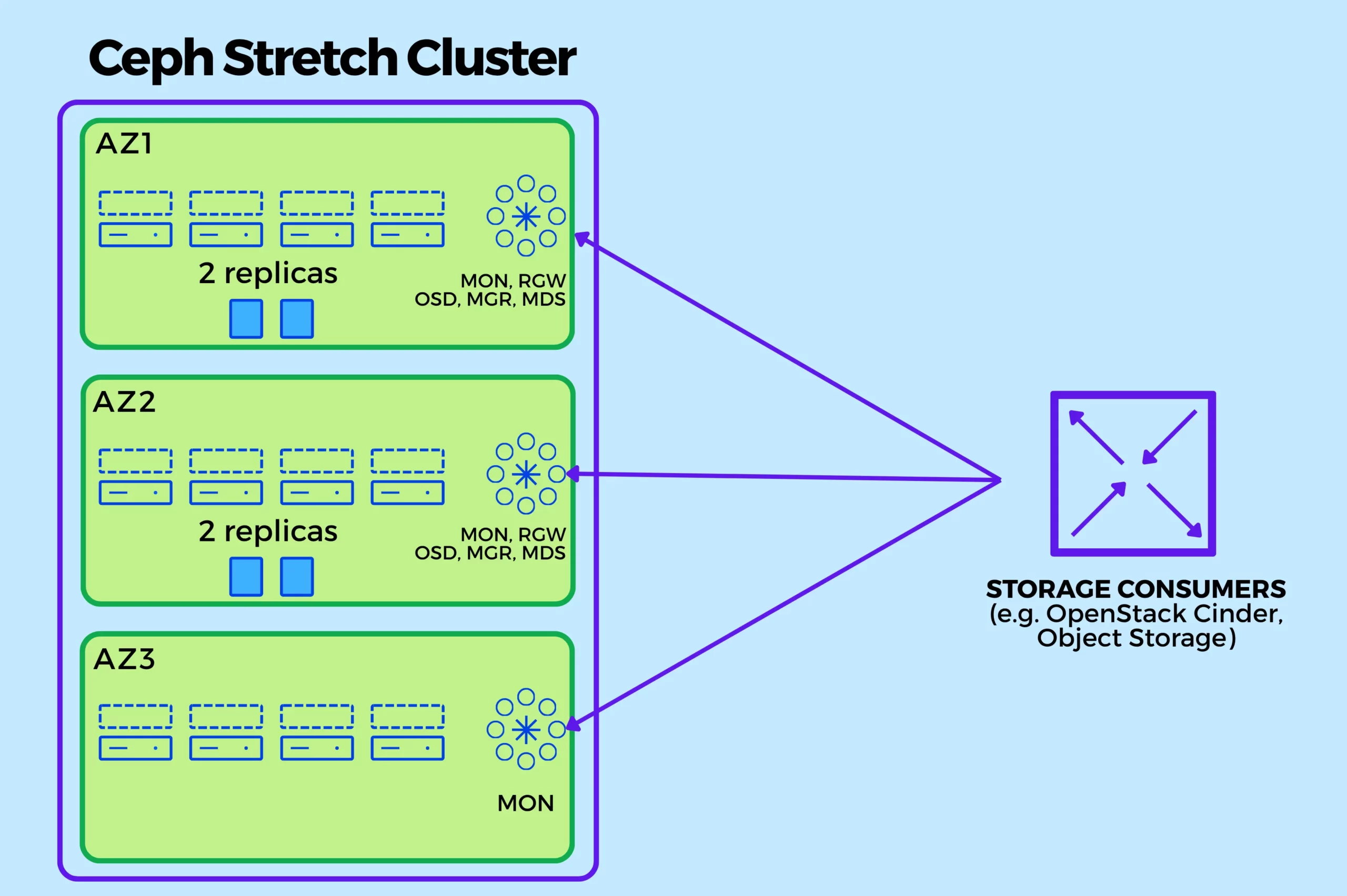
A Ceph stretch cluster distributes storage nodes across multiple availability zones while maintaining a single logical cluster. The common goal is to survive the loss of an entire AZ without data loss or prolonged downtime.
The typical design includes:
- 2 Active Availability Zones (AZs)
- 1 Arbiter (Tie-breaker) AZ
This setup ensures quorum and safeguards against split-brain scenarios.
👉 Official documentation:
The 2+1 Architecture Deepdive
The idea behind is simple: data lives in two places, decisions are made in three.
A standard Ceph cluster usually requires an odd number of monitors (MONs) for quorum (e.g. 3 or 5). In a stretched setup spanning only two data centers, if you lose the network link, both sides might think the other is dead, leading to the “Split-brain” situation that is hard to fix.
The Ceph stretch cluster solves this by introducing a third site or AZ called the Arbiter. This one doesn’t need to be a large DC or a whole room, typically a part of the rack would be enough for placing an additional server and switch, or a few of those.
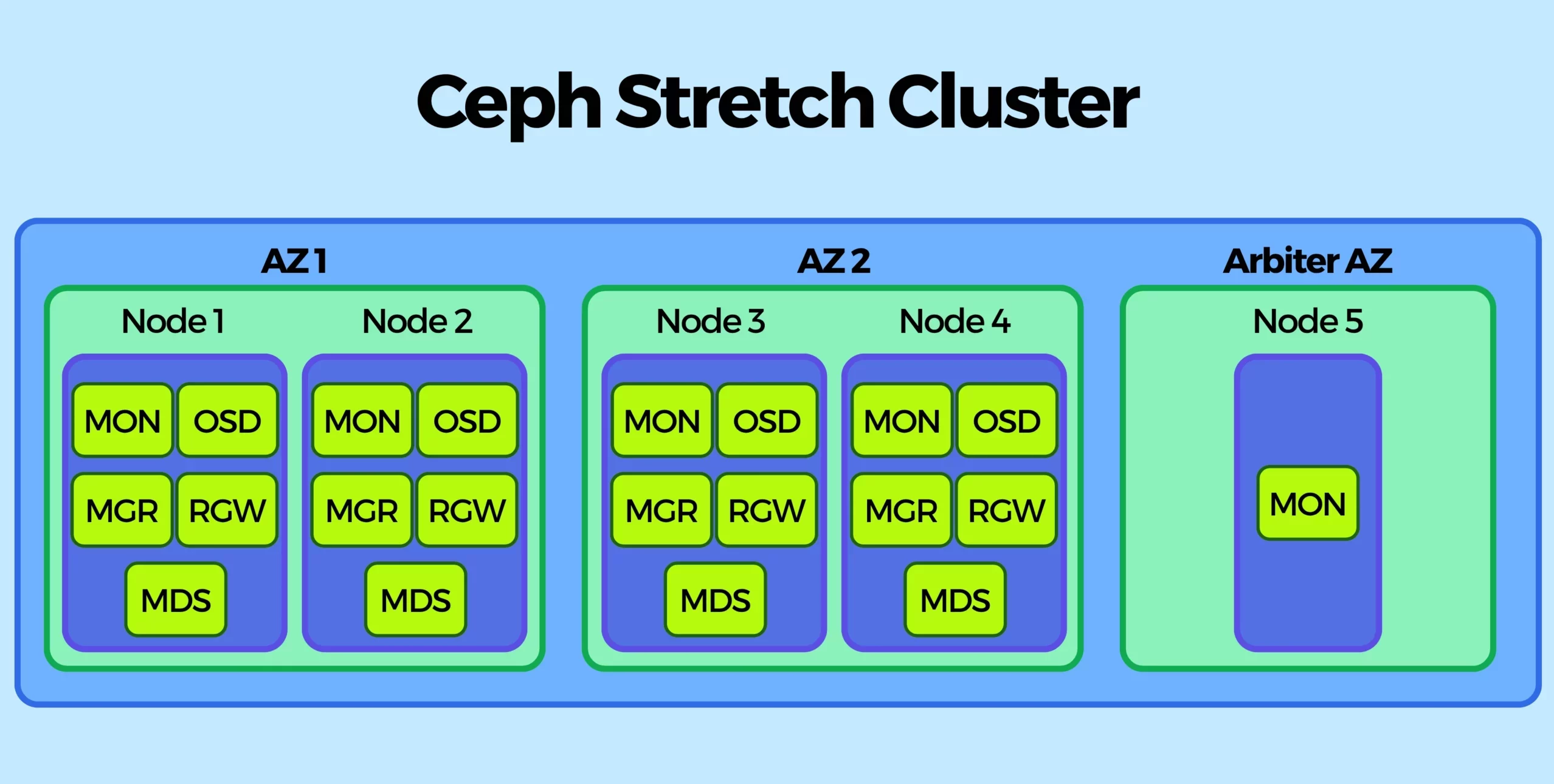
Here is how the architecture looks.
Key Components
- Ceph OSDs distributed evenly across AZ1 and AZ2 (one OSD for each Ceph-managed disk)
- Ceph MGRs distributed evenly across AZ1 and AZ2 (typically with 2 replicas)
- Ceph MDSs distributed evenly across AZ1 and AZ2 (typically with 2 replicas)
- Ceph RGWs distributed evenly across AZ1 and AZ2 (with 2, 4 or more replicas depending on the load)
- Ceph MONs placed across all three AZs (including Arbiter, with either 3 or 5 replicas out of which only 1 will be in Arbiter AZ)
- Arbiter AZ hosts only MONs (no data, no OSDs)
- Failure domains mapped to AZs using CRUSH rules
Logical Flow
- Zone 1 (Active): Runs multiple OSDs, MONs, Managers.
- Zone 2 (Active): Runs preferably the same number of OSDs, MONs, Managers as Zone 1.
- Zone 3 (Arbiter): Runs no OSDs, but hosts a single Monitor. Its sole job is to provide a tie-breaking vote to ensure quorum in case of failure of AZ1 or AZ2.
- Ceph ensures consistency via CRUSH placement rules which require correct failure domains set on all nodes in the cluster (typically via Kubernetes zone labels).
- When using Rook, it will automatically place OSDs into correct CRUSH zones thus avoiding the need for manual CRUSH editing.
- For stretched Pools, writes are synchronously replicated between AZ1 and AZ2; for AZ-local Pools, the writes are bound to respective AZ.
Simplified Architecture
| Component | AZ1 | AZ2 | Arbiter AZ |
|---|---|---|---|
|
OSDs |
✅ |
✅ |
❌ |
|
MONs |
✅ |
✅ |
✅ |
|
MGRs |
✅ |
✅ |
❌ |
|
RGWs |
✅ |
✅ |
❌ |
|
MDSs |
✅ |
✅ |
❌ |
|
Client Access |
✅ |
✅ |
❌ |
|
Data Replication |
↔️ |
↔️ |
❌ |
|
Rook Operator |
1x Replica in any AZ |
||
Replication Settings
To make such a setup work, the default size=3 replication has to change to min_size=2 and size=4.
- The 4 replicas are distributed as 2 copies in Zone 1 and 2 copies in Zone 2.
- The min_size determines how many replicas are required for I/O to proceed.
- In case one zone completely disappears, the remaining zone has exactly 2 copies, allowing Pools to stay active and accept reads and writes.
Configuring with Rook
1. In your CephCluster Custom Resource, you define the stretch cluster settings like this:
spec:
  mon:
    count: 5 # 2x in Zone 1, 2x in Zone 2, 1x in Arbiter
  stretchCluster:
    failureDomainLabel: topology.kubernetes.io/zone
    subFailureDomain: host
    zones:
      - name: eu-west-1a # The Data Zone (AZ1)
      - name: eu-west-1b # The Data Zone (AZ2)
      - name: eu-west-1c # The Arbiter Zone
        arbiter: true
2. It is crucial that all Kubernetes nodes in the cluster have a topology.kubernetes.io/zone label set to one of the zones.
One could do it manually via kubectl:
kubectl label node node1 topology.kubernetes.io/zone=eu-west-1a
kubectl label node node2 topology.kubernetes.io/zone=eu-west-1a
…
kubectl label node node3 topology.kubernetes.io/zone=eu-west-1b
…
kubectl label node node5 topology.kubernetes.io/zone=eu-west-1c
Or with a tool such as NodePool Labels Operator.
3. For topology based provisioning it is also crucial to set CSI_ENABLE_TOPOLOGY: “true” in Rook Operator config.
4. Last, but not least, we should spread the Ceph components between AZs correctly, as per Simplified Architecture table above. Ceph Monitors to be present in each AZ and all others to be present in AZ1 and AZ2 only. Under placement: section we add:
placement:
  # -------------------------
  # MONs (present in all AZs)
  # -------------------------
  mon:
    podAntiAffinity:
      preferredDuringSchedulingIgnoredDuringExecution:
      - weight: 100
        podAffinityTerm:
          topologyKey: topology.kubernetes.io/zone
          labelSelector:
            matchLabels:
              app: rook-ceph-mon

  # -------------------------------
  # MGR (2 replicas in AZ1 and AZ2)
  # -------------------------------
  mgr:
    nodeAffinity:
      requiredDuringSchedulingIgnoredDuringExecution:
        nodeSelectorTerms:
        - matchExpressions:
          - key: topology.kubernetes.io/zone
            operator: In
            values: ["eu-west-1a", "eu-west-1b"]
    podAntiAffinity:
      requiredDuringSchedulingIgnoredDuringExecution:
      - topologyKey: kubernetes.io/hostname
      preferredDuringSchedulingIgnoredDuringExecution:
      - weight: 100
        podAffinityTerm:
          topologyKey: topology.kubernetes.io/zone
          labelSelector:
            matchLabels:
              app: rook-ceph-mgr

  # -------------------------------
  # MDS (2 replicas in AZ1 and AZ2)
  # -------------------------------
  mds:
    nodeAffinity:
      requiredDuringSchedulingIgnoredDuringExecution:
        nodeSelectorTerms:
        - matchExpressions:
          - key: topology.kubernetes.io/zone
            operator: In
            values: ["eu-west-1a", "eu-west-1b"]
    podAntiAffinity:
      requiredDuringSchedulingIgnoredDuringExecution:
      - topologyKey: kubernetes.io/hostname
      preferredDuringSchedulingIgnoredDuringExecution:
      - weight: 100
        podAffinityTerm:
          topologyKey: topology.kubernetes.io/zone
          labelSelector:
            matchLabels:
              app: rook-ceph-mds

  # -------------------------------
  # RGW (2 replicas in AZ1 and AZ2)
  # -------------------------------
  rgw:
    nodeAffinity:
      requiredDuringSchedulingIgnoredDuringExecution:
        nodeSelectorTerms:
        - matchExpressions:
          - key: topology.kubernetes.io/zone
            operator: In
            values: ["eu-west-1a", "eu-west-1b"]
    podAntiAffinity:
      preferredDuringSchedulingIgnoredDuringExecution:
      - weight: 100
        podAffinityTerm:
          topologyKey: topology.kubernetes.io/zone
          labelSelector:
            matchLabels:
              app: rook-ceph-rgw

  # -------------------------------
  # OSDs (data only in AZ1 and AZ2)
  # -------------------------------
  osd:
    nodeAffinity:
      requiredDuringSchedulingIgnoredDuringExecution:
        nodeSelectorTerms:
        - matchExpressions:
          - key: topology.kubernetes.io/zone
            operator: In
            values: ["eu-west-1a", "eu-west-1b"]

  # ----------------------------------
  # Optionally bind CSI to AZ1 and AZ2
  # ----------------------------------
  csi:
    plugin:
      nodeAffinity:
        requiredDuringSchedulingIgnoredDuringExecution:
          nodeSelectorTerms:
          - matchExpressions:
            - key: topology.kubernetes.io/zone
              operator: In
              values: ["eu-west-1a", "eu-west-1b"]

    provisioner:
      nodeAffinity:
        requiredDuringSchedulingIgnoredDuringExecution:
          nodeSelectorTerms:
          - matchExpressions:
            - key: topology.kubernetes.io/zone
              operator: In
              values: ["eu-west-1a", "eu-west-1b"]
Why Network Isolation is Mandatory
If you deploy the above Rook configuration using a standard Kubernetes CNI (like Cilium or Calico in overlay mode), you will face Ceph performance degradation.
The problem – Ceph is extremely sensitive to network latency. The replication traffic between Zone A and Zone B must be fast. But not only between the Zones, it must also be fast within each Zone. Regardless of how many zones you have, when you run Ceph replication traffic over the Kubernetes overlay network, you add encapsulation overhead (typically VXLAN/Geneve) and NAT hops. This “small latency” adds up, causing Ceph write latency to increase. And because Ceph replication is synchronous, the slowest replica defines the actual volume performance.
The Solution – at Cloudification, we advocate for a slightly different approach. For our c12n private cloud deployments we bypass the Kubernetes overlay for Ceph replication traffic entirely. With Kubernetes Multus, we attach a secondary network interface to the Ceph pods. This interface maps directly to a VLAN on the physical network dedicated solely to the storage traffic.
Not just such architecture eliminates the overlay overhead, but it allows to configure QoS for that specific storage VLAN ensuring Ceph packets to be prioritized in busy and HCI environments where a single physical NIC is used for both compute and storage traffic at the same time.
By configuring Rook to use provider: multus, we ensure:
- Less Overhead: Ceph RBD traffic bypasses Cilium (our CNI of choice) entirely.
- Deterministic Latency: The packets travel via standard routing/switching, making it easier to ensure low round trip times (RTT). The RTT between AZ should be under <5ms and even better <2ms.
- Security: Storage traffic is additionally isolated from other pod-to-pod applications and control traffic.
With c12n private cloud, we automate the whole setup of Rook-Ceph with GitOps, making a complex Multus setup as simple as ticking a box.
Integration with OpenStack and Avoiding Cross-AZ Traffic
Now, you have a Ceph cluster spanning 2+1 AZs with correct failure domains and Rook settings performing at its best by skipping an overlay K8s network. When you connect OpenStack (e.g. Cinder, Glance, etc.) to this cluster, you face a new problem – cross-AZ volume mounting.
In reality, while you might have a stretched Ceph pool with a replication factor of 4 (two copies per data AZ), it will be used for most important workloads. For other cases, having 3 replicas kept in one AZ is often sufficient and this is also what major cloud providers tend to offer. Therefore, next we explore the setup with a stretched Ceph cluster and AZ-local Ceph pools.
The obvious problem happens when OpenStack Nova schedules a VM in Zone A, but Cinder attaches a root volume of that VM from Zone B. That means every volume I/O will traverse the stretched cross-AZ link. This saturates your inter-DC link and negatively impacts volume and VM performance.
The solution is to enforce VM-Storage AZ Affinity. Below we see how to configure the AZ in OpenStack to disallow cross-AZ volume attachments and schedule VM root volumes in the same AZ as the VM itself.
Before diving into commands, let’s see all parts align:
- A Stretched Ceph Cluster: a single, multi-AZ Ceph cluster with extra CRUSH rules to ensure data Pools are bound to a specific AZ (e.g., a Pool with 3 replicas in AZ1, and another with 3 replicas in AZ2).
- Cinder Backend: You configure two separate Cinder backend sections in cinder.conf. Both point to the same Ceph cluster but map to different AZ-specific pools and CRUSH rules.
- Nova Configuration: You enforce that a volume created in AZ1 can only be attached to a VM running on a compute node in AZ1 and similar for AZ2.
Step 1: Configure Ceph Pools and CRUSH Rules
On the Ceph side, we’ll need distinct Pools and CRUSH rules for each AZ. Let’s create the CRUSH rules:
ceph osd crush rule create-replicated rule-az1 az1 host
ceph osd crush rule create-replicated rule-az2 az2 host
For AZ1 – Create a pool that uses respective CRUSH rule confining data to AZ1:
ceph osd pool create cinder_volumes_az1 128 128
ceph osd pool set cinder_volumes_az1 size 3
ceph osd pool set cinder_volumes_az1 crush_rule rule-az1
ceph osd pool set cinder_volumes_az1 pg_autoscale_mode on
For AZ2 – Similarly, create a second pool confined to AZ2:
ceph osd pool create cinder_volumes_az2 128 128
ceph osd pool set cinder_volumes_az2 size 3
ceph osd pool set cinder_volumes_az2 crush_rule rule-az1
ceph osd pool set cinder_volumes_az2 pg_autoscale_mode on
Step 2: Configure Cinder for AZ-Aware Backends
Edit /etc/cinder/cinder.conf consumed by Cinder. You will need to define two backend sections pointing to the same cluster but different pools we created above.
[ceph-az1]
volume_driver = cinder.volume.drivers.rbd.RBDDriver
volume_backend_name = ceph-AZ1
rbd_pool = cinder_volumes_az1
rbd_user = cinder
rbd_ceph_conf = /etc/ceph/ceph.conf
storage_availability_zone = AZ1

[ceph-az2]
volume_driver = cinder.volume.drivers.rbd.RBDDriver
volume_backend_name = ceph-AZ2
rbd_pool = cinder_volumes_az2
rbd_user = cinder
rbd_ceph_conf = /etc/ceph/ceph.conf
storage_availability_zone = AZ2
If you want to limit Cinder Volume to serve only specific availability zone, add the following into cinder.conf:
# Assign the Cinder Volume to a specific Availability Zone (AZ1|AZ2):
storage_availability_zone = AZ1
Then, in the [DEFAULT] section of all Cinder components, list both backends:
enabled_backends = ceph-az1, ceph-az2Step 3: Create Cinder Volume Types
Volume types expose the backend capabilities to the end-users. Let’s create those using OpenStack CLI:
# Create type for AZ1
openstack volume type create --public AZ1
openstack volume type set --property volume_backend_name=ceph-AZ1 AZ1

# Restrict this type to only be usable in AZ1
openstack volume type set --property RESKEY:availability_zones=AZ1 AZ1

# Create type for AZ2 and limit the AZ via property
openstack volume type create --public AZ2
openstack volume type set --property volume_backend_name=ceph-AZ2 AZ2
openstack volume type set --property RESKEY:availability_zones=AZ2 AZ2
Step 4: Configure Nova for Strict AZ Affinity
To prevent Nova from moving a VM away from its volume to a different AZ, you must adjust compute scheduling and attachment policy.
A. First disable Cross-AZ Attachments by editing /etc/nova/nova.conf on your controller nodes:
[cinder]
cross_az_attach = False
If this remains True, a user could launch a VM in AZ1 but attach a root volume from AZ2, causing added latency. Setting this to False forces the scheduler to enforce locality.
Make sure to restart OpenStack components that had their configs changed (Nova and Cinder).
B. Configure Host Aggregates. To ensure compute nodes are correctly tagged with their AZ:
# Create aggregate for AZ1 and add all compute nodes from that AZ
openstack aggregate create --zone AZ1 Agg-AZ1
openstack aggregate add host <compute-node-az1-1> Agg-AZ1
…
openstack aggregate add host <compute-node-az1-N> Agg-AZ1

# Create aggregate for AZ2 and add all compute nodes from that AZ
openstack aggregate create --zone AZ2 Agg-AZ2
openstack aggregate add host <compute-node-az2-1> Agg-AZ2
…
openstack aggregate add host <compute-node-az2-N> Agg-AZ2
Now Nova’s AvailabilityZoneFilter will automatically use this metadata to place VMs correctly.
Step 5: Testing Boot from Volume
With the configuration complete, the user workflow to guarantee “same AZ” is:
- User selects AZ1 in the boot instance form.
- User selects Volume Type AZ1 for the root VM disk.
- Nova Scheduler finds the right host:
- It filters hosts to only those in AZ1 via AvailabilityZoneFilter.
- Nova sends the request to Cinder to create a volume.
- Cinder sees the type AZ1 and routes it to the ceph-az1 backend (which writes to the cinder_volumes_az1 Ceph pool).
- Cinder creates the volume (data lands in AZ1 Ceph OSDs).
- Nova boots the VM on a compute host in AZ1. Because cross_az_attach=False.
- Check that the same works correctly for AZ2.
Be aware that if you migrate a VM from AZ1 to AZ2 (e.g., via host evacuate or manual live migration), the cross_az_attach=False policy will fail the migration because the volume cannot move with the VM. You must use “Cold Migration” with VM shutdown and “Volume Retype” first to change the AZs.
Final Thoughts
A Ceph stretch cluster is a powerful pattern for active-active resilience, but it is a surgical tool, not a hammer. It requires careful setup, sub-millisecond cross-AZ latency, redundant network and typically the same hardware in AZs.
By utilizing Rook for Ceph orchestration, Multus for storage traffic isolation and a few OpenStack controls, you can build a multi-AZ cloud that survives a loss of availability zone. From the operational perspective, such outages generate an enormous Ceph replication traffic (when the failed AZ comes back or if it flaps) which can easily saturate even 100GBit links. But this is a topic for another blog post.
Ready to stretch your cloud?
With c12n private cloud, we provide the state of the art automation and expertise to deploy Ceph storage clusters tailored to your requirements. Schedule a call today!


