


Discover Flatcar Linux: Immutable Infrastructure for Kubernetes at Scale
In the rapidly evolving world of cloud-native computing, choosing the right foundation for your infrastructure is crucial. When people think of Linux servers, distributions like Ubuntu, RedHat Enterprise Linux, or CentOS Stream often come to mind. However, Flatcar Linux takes a completely different approach. Instead of being a general-purpose operating system, Flatcar is specifically designed to run containerized workloads such as Kubernetes clusters with maximum security, reliability, and automation.
As organizations increasingly adopt Kubernetes and container technologies, and in an era where servers are expected to be treated like “cattle” rather than manually maintained, understanding the value of a purpose-built OS like Flatcar is crucial. In this article we explore what makes Flatcar unique, its advantages over traditional Linux distributions, and why it might be the ideal choice for your next cloud-native project.
What is Flatcar Container Linux? Modern Linux for Modern Workloads
At its core, Flatcar is a minimalist Linux operating system designed from the ground up for one primary purpose: to efficiently and securely run containers. Originally forked from CoreOS Container Linux, after Red Hat acquired CoreOS in 2018 and Container Linux reached end of life in 2020, Flatcar has evolved into a vibrant open-source project, gaining significant momentum and even being accepted into the Cloud Native Computing Foundation (CNCF) as an incubating project. This endorsement from the CNCF underscores its maturity and growing importance in the cloud-native ecosystem.
The philosophy behind Flatcar is simple: why manage a full operating system with package managers and countless services when your applications are packaged in containers? By stripping away everything except the essentials, Flatcar provides a lean, secure, and highly efficient platform for container orchestration, particularly Kubernetes. Its immutable nature means that instead of patching and updating the OS in-place, you deploy new images, a concept that aligns perfectly with modern infrastructure-as-code practices.
The Pillars of Flatcar: Security, Automation, and Immutability
Flatcar’s architecture is built on three core pillars that deliver exceptional benefits for production environments.
Immutable Infrastructure: The Foundation of Consistency
One of the most defining features of Flatcar is its immutable filesystem. The core OS partitions, particularly /usr, are read-only at runtime. You cannot directly install packages, modify system binaries, or make ad-hoc changes to the OS. This design enforces consistency across your entire fleet.
Think of a traditional operating system like Ubuntu or CentOS. Over time, configuration drift might occur as administrators install different packages or tweak system files, leading to “snowflake” servers that are hard to replicate and debug. Flatcar eliminates this problem entirely. Every instance is an exact copy of a well-defined image, making your infrastructure truly immutable and predictable. If you need to make a change to the base OS, you don’t SSH in and run a command; you create a new image and redeploy. This is similar to how tools like Kairos operate, treating the OS image as a single, atomic unit.
Automated and Atomic Updates: Effortless Security
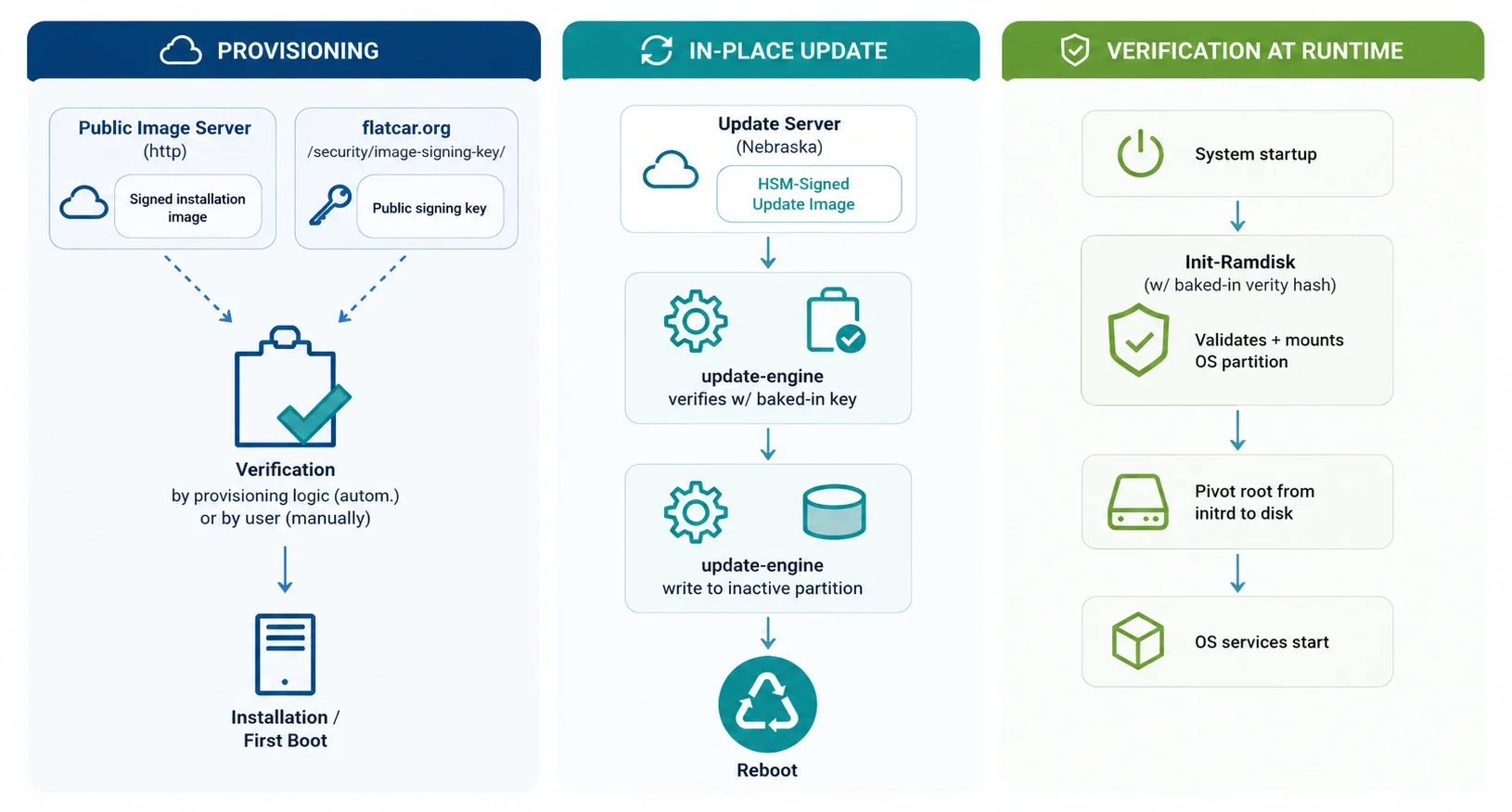
Keeping an OS secure is a constant battle, especially today when AI advancements have dramatically accelerated discovery of new CVEs, but Flatcar makes it remarkably simple. It features an automated, atomic update mechanism inherited from ChromeOS. The system uses an A/B partition scheme: a new version is downloaded and applied to the inactive partition. Upon reboot, the system boots from the updated partition. If the update fails or causes issues, the system automatically rolls back to the previous, working partition.
This eliminates the risks and operational overhead associated with traditional package managers like apt-get update or yum update. There’s no need to babysit upgrade processes, resolve dependency conflicts, or worry about a failed patch breaking a node. Your entire fleet can stay consistently up-to-date with the latest security patches and features. For advanced control over this process, Flatcar provides the Nebraska update server, which allows you to manage update policies, create groups, and rate-limit (slow down) rollouts across your infrastructure.

Minimal Attack Surface: Security by Design
By including only the essential components needed to run containers, Flatcar drastically reduces its attack surface. Without a package manager, extraneous services, or a writable system partition, there are fewer entry points for malicious actors. Combined with security features like SELinux enabled by default, Flatcar provides a robust, fortress-like environment for your containerized applications. This focus on security and manageability is a key reason why organizations choose Flatcar.
It is important to mention that this doesn’t mean you can’t extend the OS when needed. For host-level tools that can’t run as containers—like custom container runtimes, Kubernetes binaries, or kernel drivers—Flatcar supports systemd-sysext extensions, which overlay additional software onto the immutable system without compromising its security model. For deeper customization, you can also build custom images from source using the official SDK, allowing you to patch packages or modify the kernel configuration. However, the recommended workflow is to use containers for applications and reserve extensions, or custom builds for essential, host-level software, preserving Flatcar’s security, immutability, and automated update benefits.
How Flatcar Works: Under the Hood of an Immutable OS
To truly appreciate Flatcar, it’s helpful to look under the hood. Its magic lies not in what you can change, but in what you cannot – and in how that constraint is engineered for unparalleled reliability.
An OS is "Provisioned, Not Installed"
Traditional Linux distributions are usually installed and then modified over time. Flatcar flips this script: it is provisioned rather than installed. When you create a new Flatcar node, you provide a declarative configuration file that describes everything about that system – users, network setup, storage, and system services to run. This configuration is applied once, at first boot, by a tool called Ignition.
Ignition runs very early in the boot process from the initramfs (a temporary root filesystem loaded into memory that contains essential drivers and tools needed to mount the real root filesystem and kickstart the system ) and has the power to repartition disks, format filesystems, create users, and write essential files before the main system even starts. This ensures every node starts in a precise, known state, preventing the dreaded “configuration drift” that plagues long-lived servers. For a human-readable format, you write your configuration in Butane (a YAML format) and then transpile it to the JSON format that Ignition understands.
The Immutable Core and the Power of A/B Partitions
At the heart of Flatcar’s design is its immutable filesystem. All of the operating system’s core binaries and libraries live on a read-only /usr partition. As you can see in the table below, this partition is one of nine that make up the Flatcar disk layout. This partition is not just read-only; it’s protected by dm-verity, a Linux kernel feature that cryptographically verifies the partition’s integrity at the block level. This makes tampering with the OS nearly impossible, dramatically shrinking the attack surface.
But if /usr is read-only, how do you get updates? This is where the elegant A/B partition scheme comes in.
| Partition Label | Purpose | Details |
|---|---|---|
|
EFI-SYSTEM |
Bootloader |
Contains GRUB and kernel/initrd images |
|
USR-A |
Active/Passive OS |
Holds the /usr filesystem; one partition is active, the other is spare |
|
USR-B |
Passive/Active OS |
The counterpart to USR-A; the update is written here |
|
ROOT |
Stateful partition |
Stores persistent data like container images, is read/write and not touched by updates |
|
OEM |
Vendor-specific config |
Holds platform-specific tools (e.g., cloud agents) |
Instead of patching the live OS, Flatcar downloads the update payload to the inactive /usr partition. This is done by update_engine, which communicates with the Nebraska update server. On the next reboot, the bootloader is instructed to switch to this newly updated partition. If the boot fails for any reason, the system automatically rolls back to the previous, working partition. This entire process is atomic and automatable, meaning you can keep your entire fleet secure and up-to-date with minimal effort.
Flatcar in Action: A Cloud-Native Success Story
Flatcar isn’t just a theoretical concept; it’s battle-tested in some of the world’s largest and most demanding production environments. The list of users is impressive:
- Adobe runs Flatcar on over 18,000 nodes in their multi-cloud Kubernetes fleet.
- Wipro uses it as the foundational OS for their PostgreSQL DBaaS platform.
- Equinix employs Flatcar as the OS for their bare metal cloud control plane.
- 1&1 Mail & Media uses it for their large on-premise Kubernetes installations, hosting over 40 million users.
These case studies demonstrate that Flatcar is more than capable of handling extreme scale and critical workloads. As one user eloquently put it, “Flatcar is currently among the most popular operating systems for Kubernetes clusters. With its container-optimized design, strong security, and support from an active open source community, it provides an excellent foundation for all container workloads”.
Comparing Flatcar with General-Purpose Linux
To truly appreciate Flatcar’s design, it’s helpful to compare it with the traditional Linux distributions you might be more familiar with. The differences are profound.
| Feature | Flatcar Container Linux | Ubuntu Linux | CentOS / RHEL |
|---|---|---|---|
|
Primary Purpose |
Container-optimized OS |
General-purpose Server/Desktop |
General-purpose Server |
|
Root Filesystem |
Immutable (Read-Only /usr) |
Writable |
Writable |
|
Package Manager |
None |
apt |
yum/dnf |
|
System Changes |
Via Ignition on boot or new image creation |
On-the-fly via package manager |
On-the-fly via package manager |
|
Configuration Drift |
Virtually Eliminated |
High risk over time |
High risk over time |
|
Update Mechanism |
Atomic, automatic A/B partition updates |
In-place package updates (e.g., apt upgrade) |
In-place package updates (e.g., dnf update) |
|
Update Rollback |
Automatic if boot fails |
Manual, complex |
Manual, complex |
|
Attack Surface |
Minimal |
Large |
Large |
While a general-purpose OS like Ubuntu offers incredible flexibility, that flexibility might be a burden in a containerized world and large, data center scale with hundreds and thousands servers. Flatcar provides a more specialized, secure, and maintainable approach. It’s the difference between driving a Swiss Army knife and a purpose-built sports car. Both can get you from point A to point B, but one is clearly better suited for the task.
The Future of Immutable Operating Systems
Flatcar is part of a growing movement toward immutable operating systems. Other projects such as Talos Linux, Fedora CoreOS, Kairos, and AWS Bottlerocket all share similar principles: reduce manual administration, automate updates, and make infrastructure reproducible.
As Kubernetes adoption continues to grow, immutable operating systems are becoming increasingly popular because they align with modern DevOps and platform engineering best practices. Rather than maintaining servers individually, teams manage fleets of identical machines through code, improving consistency and reducing operational risk. Recent community momentum also increased after Flatcar became a CNCF incubating project, underscoring its growing role in the cloud-native ecosystem.
How to Get Started with Flatcar
If you want to explore Flatcar, getting started is pretty straightforward. You can download an image from the official Flatcar website and run it on your preferred platform, from bare metal to any major public clouds like AWS, Azure, Google Cloud or private OpenStack cloud.
When provisioning nodes, you’ll use Ignition, a declarative configuration tool. You define your system configuration (network settings, user accounts, services) in a YAML file. On the first boot, the system uses this file to provision the node, ensuring it starts in an exact, known state. For a more human-friendly syntax, you can use Butane, which translates a YAML configuration into the Ignition format.
Once your nodes are running, you can deploy container runtimes like Docker or orchestration platforms like Kubernetes. For a Kubernetes cluster, you can use standard tools like kubeadm to quickly bootstrap a cluster on top of Flatcar. The Flatcar documentation provides excellent guides on integrating with Kubernetes and managing the OS lifecycle with Kubernetes workloads.
Is Flatcar Right for You?
| Flatcar is an excellent choice if your infrastructure primarily runs: | It may not be the right fit for: |
|---|---|
|
Kubernetes |
Traditional VM workloads |
|
Container platforms |
Legacy enterprise applications |
|
GitOps workflows |
General-purpose Linux servers |
|
Cloud-native applications |
Frequently customized individual machines |
|
Large fleets of worker nodes |
Flatcar Linux isn’t trying to replace Ubuntu or CentOS Stream – it solves a different problem.
If you need a flexible operating system for general-purpose workloads, traditional Linux distributions remain an excellent choice. However, if your infrastructure revolves around Kubernetes, GitOps automation, and immutable infrastructure, Flatcar provides a streamlined operating system that reduces operational complexity while improving security and consistency.
Its image-based updates, minimal attack surface, and cloud-native design make it an increasingly attractive option for organizations building modern container platforms. Whether you’re operating Kubernetes on public cloud, OpenStack, VMware, or bare metal, Flatcar is well worth evaluating as a secure and highly automated foundation for your infrastructure.
Ready to build a modern, cloud-native infrastructure?
At Cloudification, we are passionate about open-source technologies that empower businesses to build scalable and secure private clouds. While exploring the potential of Flatcar for future solutions, our expertise lies in helping you design, deploy, and manage robust cloud environments tailored to your needs. We specialize in Kubernetes, OpenStack, Ceph and other cutting-edge open source technologies. Explore our c12n private cloud solution to see how we can help you on your cloud-native journey. Contact us today to learn more about how we can bring the power of immutable infrastructure and container optimization to your organization.


