


MAAS for OpenStack: How to use Metal as a Service to Power Private Cloud
Why does MAAS for OpenStack matter in 2026? Metal as a Service (MAAS) has been one of the most important building blocks of modern private cloud infrastructure. Over the last few years, companies have been rethinking virtualization strategies, especially as licensing costs, vendor lock-in concerns, and cloud repatriation trends have increased.
What do organizations want in 2026?
- Cloud-like automation
- Full hardware performance
- Predictable costs
- Open-source flexibility
- NO vendor lock-in
This is exactly where MAAS fits, and why, at Cloudification, it became a foundational component of our meticulously designed c12n Private Cloud Platform. MAAS is a powerful solution for handling physical servers with the agility typically associated with Virtual Machines. So, instead of treating physical servers as slow, manual assets, we treat them as programmable infrastructure.
In short: MAAS turns a rack of bare metal servers into something that behaves like a cloud.
But what is Metal as a Service, aka MAAS?
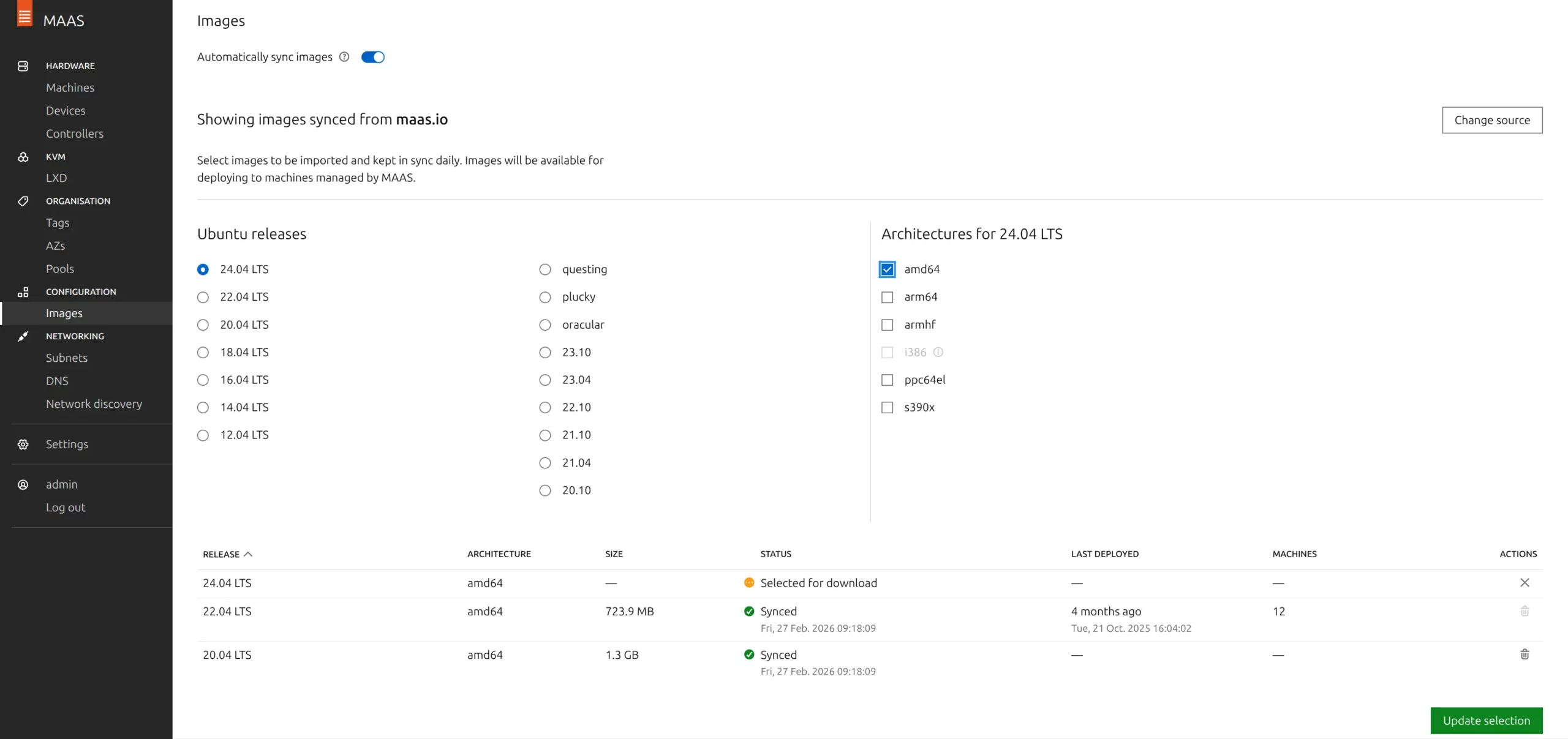
Metal as a Service (MAAS) is a provisioning and lifecycle management system for bare metal servers. It is a model that automates and streamlines the configuration, deployment, and ongoing management of physical bare metal servers. It is open-source software, maintained by Canonical, and it allows administrators to manage physical machines with the same automation you expect from virtual machines or cloud instances. With MAAS you can provision servers over the network fast with Windows or Linux helping you to turn data centers into working clusters.
So instead of plugging in USB installers, mounting boot CDs, entering BIOS manually, and installing operating systems one by one, you simply connect servers to the network, and MAAS does the rest via a management interface.
Apart from bare metal, it allows provisioning of virtual machines using the same set of tools and processes. MAAS uses PXE and IPMI (and newer protocols such as Redfish) to simplify imaging machines on your network, eliminating the need for thumb drives or having to physically be at the machine. You have the advantage of being able to simply boot via network and leave the rest of the process to MAAS. MAAS will even take care of disk partitioning, RAID and network configuration if desired.
MAAS uses network boot (Preboot Execution Environment – PXE) to automatically:
- Discover servers
- Inspect hardware
- Commission servers
- Deploy operating systems
- Control power states
- Wipe the server disks for reinstallation
This approach treats physical servers much like virtual machines in the cloud, where they can be dynamically managed, provisioned, and decommissioned with minimal manual intervention.
In short: A physical server becomes a resource you can allocate, redeploy, or wipe in minutes.
How MAAS works
Network Boot (PXE Bootstrapping)
When a new server is connected to the network and powered on, it boots from the network instead of a disk as the local disk is normally empty at this point. MAAS then takes inventory of its hardware, providing detailed descriptions and allowing you to conduct firmware updates and hardware tests seamlessly. Following the inventory process, MAAS enables you to configure and deploy virtually any operating system to the machine without manual intervention.
👉🏼 MAAS provides the boot image and provisioning environment. No physical access to the server is required for installation.
Moreover, MaaS offers the capability to build custom machines using Packer by HashiCorp, ensuring uniformity across multiple platforms from a single source. If a machine is no longer needed, MaaS allows for its release and facilitates secure disk erasing to ensure data protection.
Integration with tools like Ansible, Chef, Puppet, and Terraform grants users extensive flexibility in automation beyond mere provisioning. Additionally, MaaS extends its functionality beyond provisioning to include IP address management (IPAM), DHCP, and DNS along with network discovery for bare metal clouds. Using additional plugins it is even possible to automatically feed MAAS data into the DCIM software such as NetBox. If you don’t know NetBox yet, you can start by checking out this article.
Hardware Discovery & Commissioning
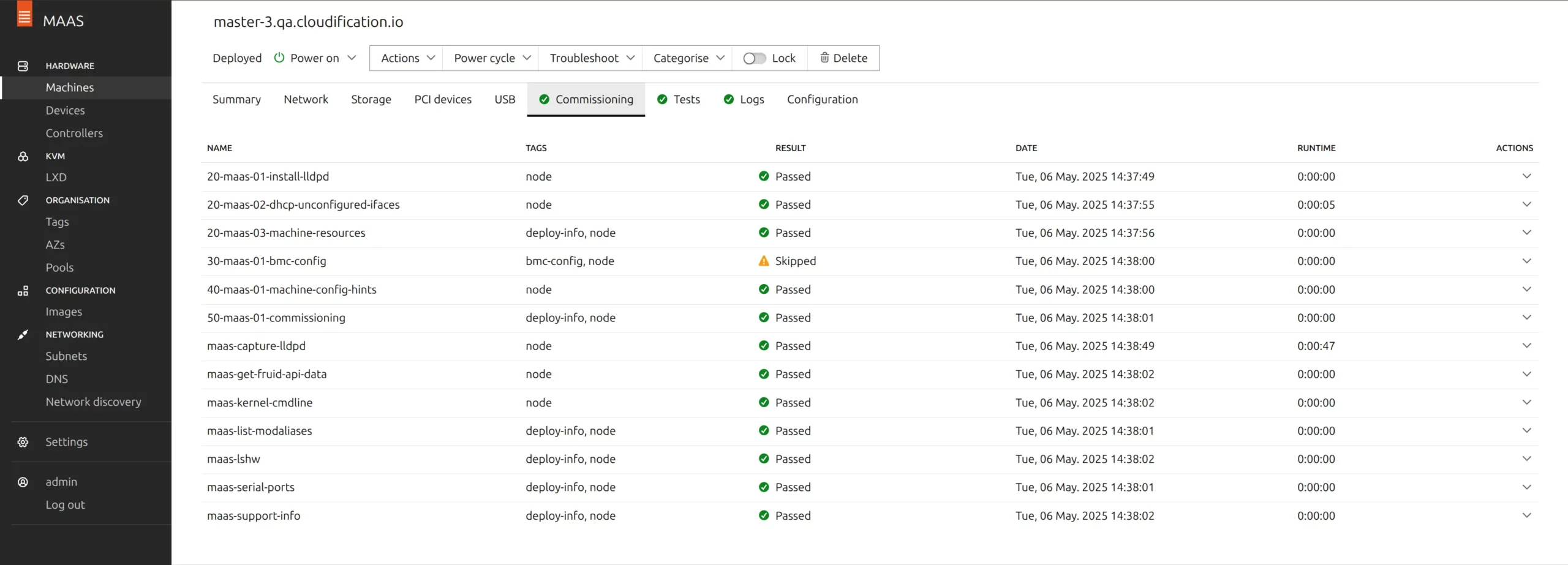
MAAS automatically inventories the machine and gathers:
- CPU model and cores
- RAM capacity
- Disk devices
- NIC interfaces
- Firmware details
You can even run firmware checks and automated hardware tests to ensure the server won’t fail suddenly with real production loads.
A successfully commissioned machine becomes Ready, meaning MAAS now controls its lifecycle.
Power Management via IPMI / BMC
MAAS integrates with server management controllers (IPMI, iDRAC, iLO, Redfish).
This allows MAAS to:
- Power on/off servers
- Reboot into provisioning
- Recover failed installations
- Redeploy remotely with newer OS images
Deployment
After commissioning, you can deploy an OS automatically:
- Ubuntu
- RHEL derivatives such as Rocky
- Windows
Deployment includes disk layout, networking, and configuration.
Lifecycle Management
A machine state can be:
- Allocated
- Redeployed
- Released
- Wiped
When released, MAAS securely erases disks and returns the machine to the resource pool.
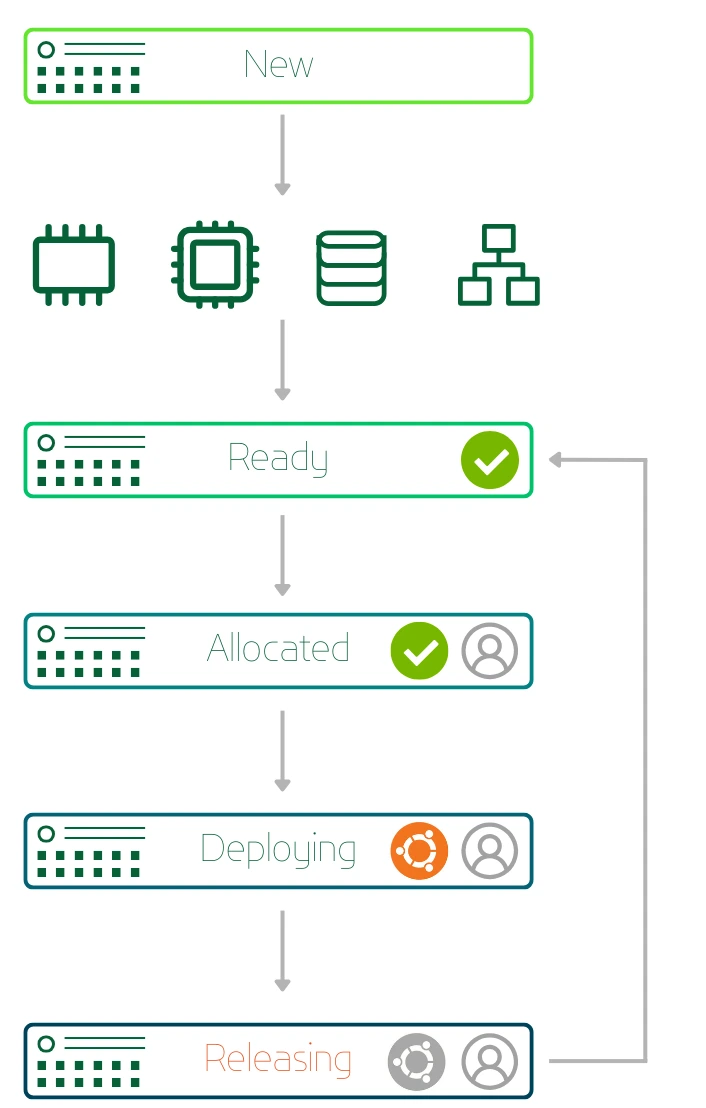
MAAS Node Lifecycle
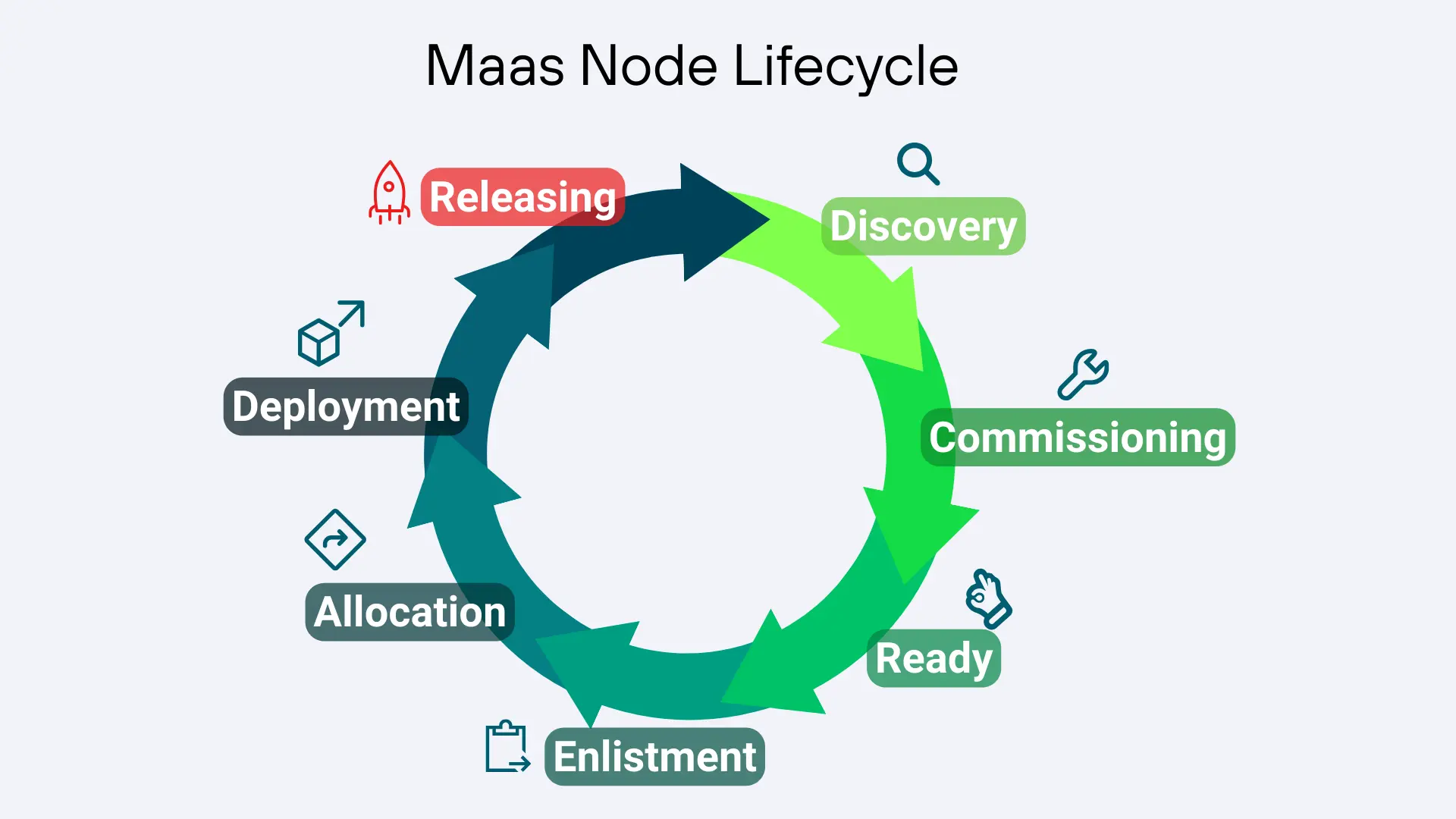
The MaaS node lifecycle refers to the series of stages that a physical server goes through from initial discovery to eventual decommissioning within the MaaS environment. Here’s an overview of the typical stages in the MaaS node lifecycle:
- Discovery
At first MAAS identifies and catalogs physical servers within the network. The network is typically a dedicated VLAN for bare metal deployments. The network is scanned for compatible hardware and information about each server’s specifications is being collected (CPU, memory, storage, network interfaces and hardware available).
- Commissioning
Servers are initialized and prepared for deployment. This involves tasks such as updating firmware, performing hardware checks, and configuring network settings to ensure compatibility with the MAAS environment.
- Ready
A machine that completes the commissioning process is labeled as “Ready.” At this stage, it possesses configured BMC credentials (for IPMI-based BMCs), enabling power control. This ensures that MAAS has the capability to initiate or cease the machine’s operation and allocate or redeploy it with a new operating system when necessary. By default MAAS will create its own BMC user for all operations.
- Enlistment
Servers are enlisted into the MAAS inventory, where they await further actions. Enlistment involves registering servers with MaaS, assigning unique identifiers, and associating them with specific hardware profiles or configurations. New machines which PXE-boot on a MAAS network will be enlisted automatically if MAAS can detect their BMC parameters.
- Allocation
Administrators assign roles or purposes to servers based on their intended use. This may involve categorizing servers into different groups, such as compute nodes, storage nodes, or network nodes, and configuring them accordingly.
- Deployment
Servers are deployed with operating systems or workloads according to predefined configurations. MaaS facilitates the automated deployment of operating systems and basic software packages, ensuring consistency and reliability across the whole fleet of servers.
- Releasing
When a user has finished using the node, they can release it back to the shared pool of server capacity. You can request MAAS to do a full disk-wipe of the machine before the node is released.
Throughout their lifecycle, servers are monitored and managed by MAAS. This includes tracking hardware health and system events, as well as performing routine maintenance tasks and applying updates or patches as needed.
At the end of their lifecycle or when no longer needed, servers are decommissioned from the MAAS environment. Decommissioning involves removing servers from active use, releasing their resources, and potentially repurposing or retiring them completely.
MAAS Components (Quick Overview)
Metal as a Service comprises several key components that work together to automate the management of physical servers. Let’s take a look at some of the main components:

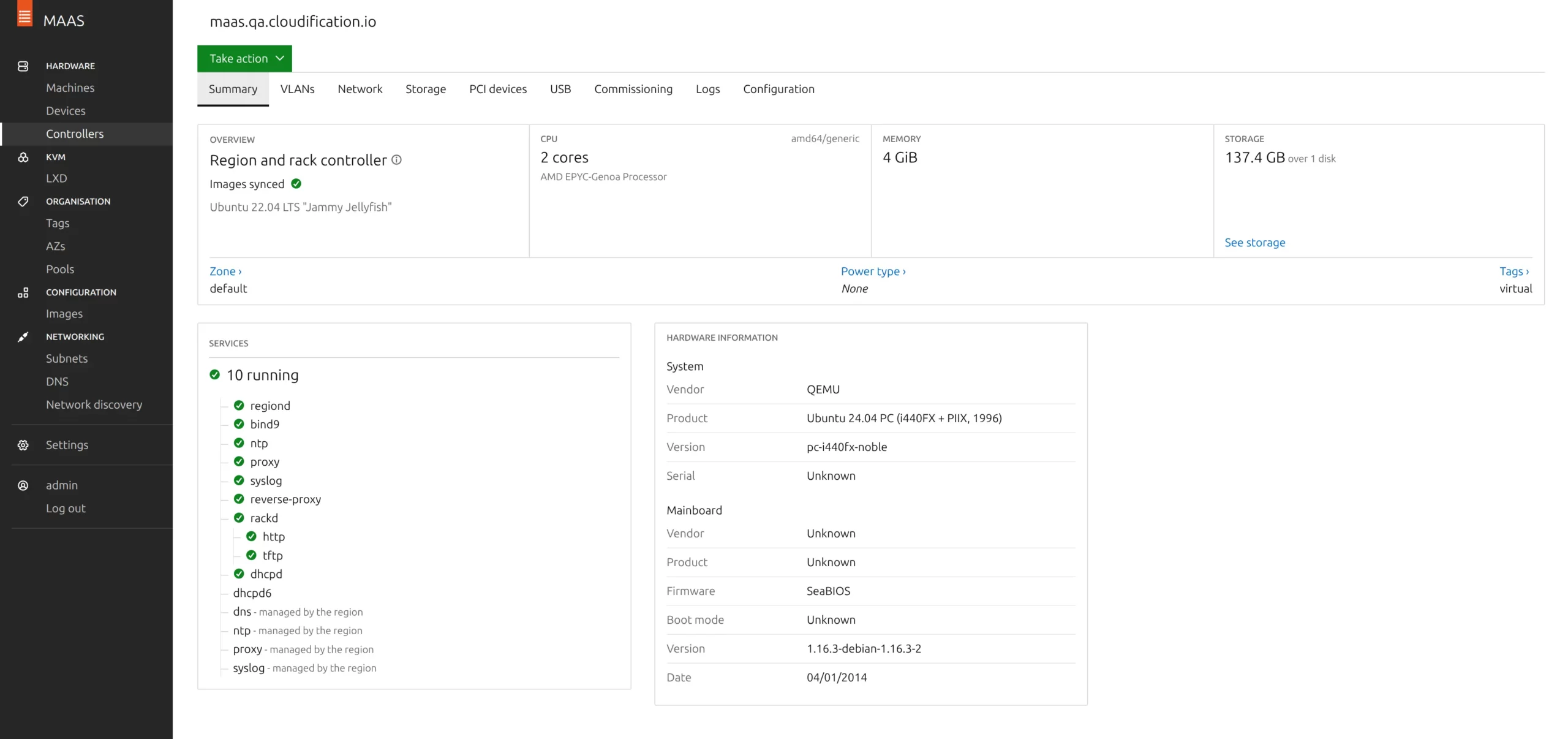
Region Controller (regiond)
The Region Controller serves as the central management hub for the MAAS deployment. It deals with operator requests and provides a web interface and APIs for users to interact with MAAS, allowing them to configure, deploy, and manage servers.
Distributed Rack Controllers (rackd)
These controllers extend MAAS functionality to manage physical servers across distributed locations or multiple data centers or simply multiple racks. They provide high-bandwidth services to multiple racks, allowing organizations to decentralize the management of their infrastructure, enabling more efficient operations and improved fault tolerance.
Rack Controller provides services such as DHCP, IPMI, PXE, TFTP.
IPMI Server
IPMI (Intelligent Platform Management Interface) plays a crucial role in enabling the remote management and monitoring of physical servers within the infrastructure.
DHCP Server
MaaS often includes a built-in DHCP server or integrates with existing DHCP infrastructure. The DHCP server assigns IP addresses to servers during the bootstrapping process, enabling communication between servers and the MAAS environment.
TFTP Server
MAAS utilizes a Trivial File Transfer Protocol (TFTP) server to deliver boot files and images to servers during the provisioning process. These files contain the necessary instructions and data for servers to bootstrap and initiate the deployment process.
PXE Bootloader
MAAS leverages the Preboot Execution Environment (PXE) to enable servers to boot from the network. The PXE bootloader initiates the boot process on servers and facilitates communication with the MAAS infrastructure to retrieve boot files and configuration data.
Why MAAS is Perfect for OpenStack
OpenStack can be seen as a cloud operating system — but it still needs real hardware underneath.
That is the difficult part many deployments underestimate. Before OpenStack can create VMs via APIs, you must first:
- Install controller nodes
- Install compute nodes
- Install storage nodes
- Install network nodes
Doing this manually is extremely slow and error-prone.
MAAS solves the “Day-0 problem” of OpenStack, answering the question how do you automatically install the bare metal servers with base OS for OpenStack.
How Cloudification Uses MAAS in c12n Private Cloud
At Cloudification, MAAS is not a standalone tool, it is the foundation layer of our c12n private cloud.
c12n is an enterprise-grade OpenStack-based IaaS platform designed as an alternative to proprietary virtualization stacks. It uses Kubernetes for container orchestration, Ceph for storage, Argo for GitOps continuous delivery, Prometheus for comprehensive monitoring, and MAAS for managing the lifecycle of bare-metal servers. To learn more about c12n, its components, and how all of it fits together, you can check out this article🩵.
Benefits of MAAS in a Private Cloud
Cloud-like Automation on Bare Metal
Physical servers become programmable resources.
Faster Scaling
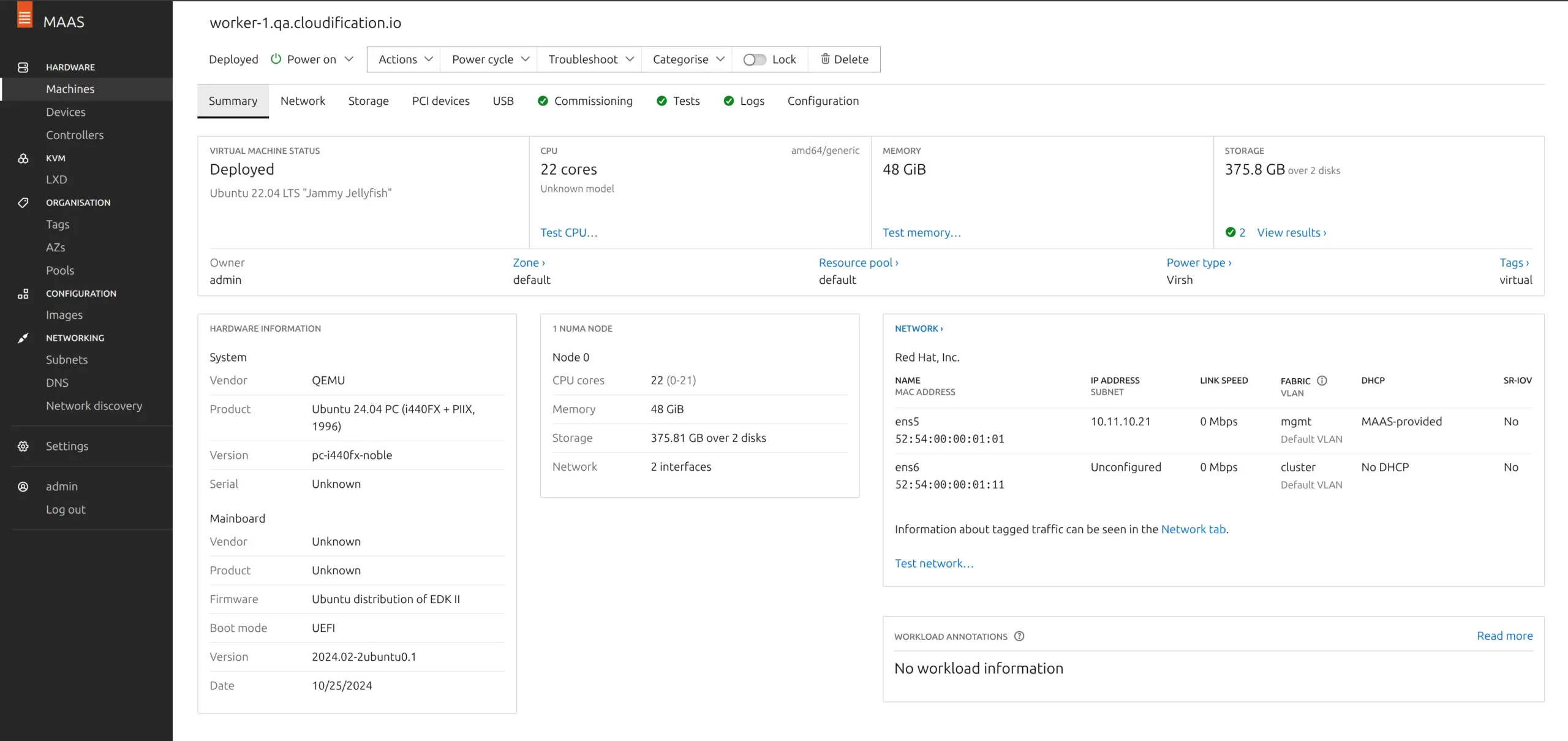
Add 20 servers? You rack them, cable them, power them → MAAS provisions them automatically. With end-to-end GitOps automation we only need to assign the label after to decide what the server will do (e.g. Compute, Control, Storage, etc.)
Reduced Human Error
No manual installs. No inconsistent BIOS settings. No configuration drift.
Hardware Reusability
Servers can be wiped and redeployed in minutes, not hours.
Cost Efficiency
You use full hardware performance without a hypervisor overhead or expensive proprietary licenses.
Pros and Cons of Metal as a Service (Maas)
Pros
Automation of complex processes
MaaS automates the provisioning, configuration, and management of hardware, reducing the potential for human error and the need for manual server configuration.
Speed and Agility
By automating provisioning, MaaS significantly reduces the time it takes to deploy physical hardware, matching the speed typically associated with virtual environments.
Flexibility
Companies can use it for both on-premise and hybrid cloud environments as well as a base for their own private cloud. Allowing great flexibility depending on the organization’s needs.
Cost Effectiveness
With improved resource utilization and reduced manual intervention, organizations can save on operational costs and reduce the need for physical interventions.
Scalability
MaaS supports the management of vast numbers of physical servers, enabling scalability without the complexity traditionally associated with large physical deployments.
Cons
Initial Setup Complexity
Setting up a MaaS environment can be somewhat complex and requires a good understanding of involved components and hardware.
Cost of Implementation
Although cost-effective in the long run, the initial investment for implementing MaaS can be significant, especially for smaller organizations. Deploying MaaS to bootstrap and manage only 3-5 servers might be an overkill.
🌰In a nutshell:
| Pros | Cons |
|---|---|
|
Full automation of hardware provisioning |
Requires proper network design (dedicated management and bootstrap VLANs) |
|
Perfect for OpenStack |
Initial setup knowledge is important |
|
Remote management via IPMI or Redfish
|
Open Source version only allows single controller per location (no HA setup) |
|
Open source |
|
|
Scalable across datacenters
|
Conclusion
Metal as a Service is no longer just a provisioning tool — it is the automation layer between hardware and cloud infrastructure. MAAS represents a significant leap forward in how organizations manage their bare metal infrastructure. With the capacity to automate and optimize the deployment and management of physical servers, MAAS can lead to remarkable improvements in efficiency, scalability, and operational control. However, the transition to MAAS requires careful planning and consideration.
At Cloudification, MAAS enables us to transform racks of physical machines into fully automated OpenStack clouds. Within c12n, MAAS handles the entire bare-metal lifecycle: discovery, commissioning, deployment, scaling, and replacement of failed servers. This allows organizations to operate a private cloud with the same agility close to public cloud providers, while retaining full control and predictable costs.
Thinking about building an OpenStack private cloud, replacing VMware, or automating your infrastructure?
Get in touch to learn how we can design, deploy, and operate a MAAS-powered cloud tailored to your environment.


